
The Analyst's Stack Part 13 of 22
Text rules instead of a language model
Before you hand a file to a model, check whether a few dozen keyword rules will do the job. Here they did: an unreadable export became a spreadsheet you can sort.
Why I built it
Someone at the desk hands you a channel export: one JSON file, about six megabytes, the entire posting history of one account. The first question is always the same. What is in here?
You cannot read it, and you cannot ask it anything either — a JSON export is a list of objects whose message text is sometimes a string, sometimes a list of fragments, and sometimes fragments mixed with link objects.
The instinct in 2026 is to hand the file to a model and ask for a summary. Why I did not: not cost, not privacy, though both matter. It is that I would have had no way to answer the next question, which is always why did it say that?
What it solves
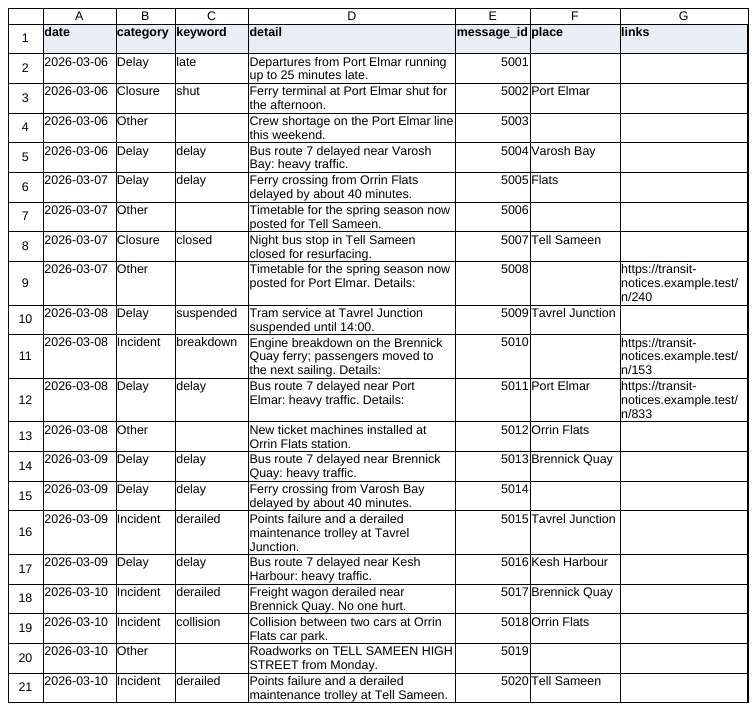
One command turns the export into 2 CSVs. The first is every message flattened into 5 columns — date, ID, sender, plain text, and the links pulled out of it. The second is an event view: the same messages with a category label, a country, a place if one can be found, the links, and the ID of the message they came from.
From there it is a spreadsheet. Sort by category and you have the shape of the archive in about a minute. Filter by keyword, with OR or AND logic, for a narrower pair of CSVs.
Six megabytes, seconds, and nothing left the machine.
How it works


Collect. Read one file. There is no network anywhere in this project, which is what makes it usable on material that is not allowed to leave the room.
Normalize. Flatten the message text — most of the real code. Walk a field that might be a string or a list of mixed fragments, join the text parts, collect URLs from both the plain text and the structured link objects.
Store. Two CSVs in output/<timestamp>/. That is the storage layer.
Analyze. Check each row’s text against a list of categories, each a small set of keywords, and take the first that matches. Check it against place keywords for a country. Run a regular expression (a pattern describing the shape of some text, so a program can find every piece of text with that shape) over it for a place name. Truncate the detail to 200 characters so the CSV stays readable.
Alert and Present do not exist.
How I built it
Python, standard library only — json, csv, re, argparse, pathlib. No
dependencies at all, which was not a purity exercise: a tool with no install step runs on
a locked-down machine, and that is the machine this kind of material tends to live on.
The decision worth defending is the one in the title. Every labelling step is a rule I wrote, in a list I can read.
That buys 4 things: it costs nothing, it is instant, nothing is transmitted anywhere, and the same export produces a byte-identical labelled CSV next year — not true of anything served over an API whose weights you do not control.
The fifth is the one I built it for. When a row is labelled I can point at the word that did it. Not “classified as X, confidence 0.87” — the literal keyword, in the literal list, on a line I can open.
The hard part was not the logic. It was the text field: the format gives 3 different shapes for the same thing, and the first version silently dropped the links that arrived as structured objects rather than as URLs in the text. It did not crash. It produced a links column emptier than it should have been, and I did not notice for a while.
What I would change: the second, deeper analysis script has its input filename hardcoded, so it is useless on any file but the one I wrote it for. And an early version filled a missing location with a fixed default instead of leaving the cell blank — the worst class of bug here, because it does not fail, it manufactures something that looks like a finding.
A look at the code
The labelling step, rewritten to stand alone, with the one change I would make now: return the word that matched, not just the label.
RULES = {
    "Closure":  ["closed", "closure", "shut", "blocked"],
    "Delay":    ["delay", "delayed", "late", "suspended"],
    "Incident": ["collision", "derailed", "breakdown", "fire"],
}

def label(text):
    """Return (category, the keyword that caused it). First rule wins."""
    lowered = text.lower()
    for category, keywords in RULES.items():
        for word in keywords:
            if word in lowered:
                return category, word
    return "Other", None

label("Bridge closed until further notice")   # ('Closure', 'closed')
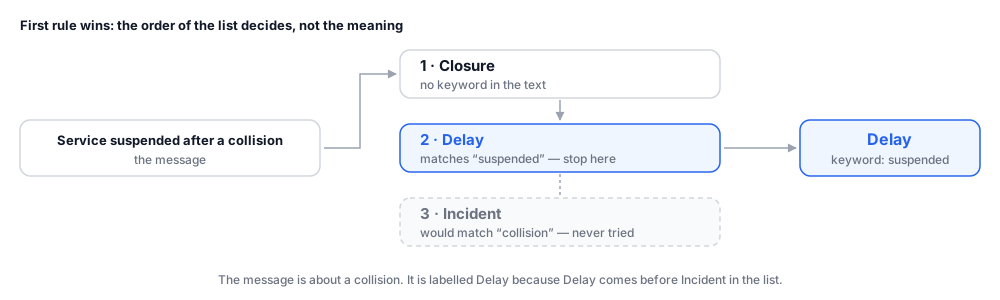
label("Service suspended after a collision")  # ('Delay', 'suspended')
label("Nothing to report today")              # ('Other', None)
Look at the second example: a message about a collision, labelled Delay, because
suspended appears earlier in the rule list. That is not a confession — it is
the property I want you to see. The rule list is the whole model, it fits on a
screen, and its mistakes are inspectable in a way no amount of prompting will get you.
The place extractor is one regular expression, and it explains its own worst limitation:
import re

PLACE = re.compile(r"(?:in|at|near|area of)\s+([A-Z][a-z]+(?:\s+[A-Z][a-z]+)?)")

def place(text):
    m = PLACE.search(text)
    return m.group(1) if m else None

place("A fault near Hillcrest Junction")   # 'Hillcrest Junction'
place("Delays at ORCHARD ROAD")            # None — all caps
place("Flooding in the north of the city") # None — 'the' is not capitalised
[A-Z][a-z]+ defines “place name” as one Latin capital followed by Latin lower-case
letters. Everything else — an all-caps name, a hyphenated one, a name
in a non-Latin script, a language that glues its prepositions onto the noun — is
invisible to it. Not wrong. Invisible, which is worse.
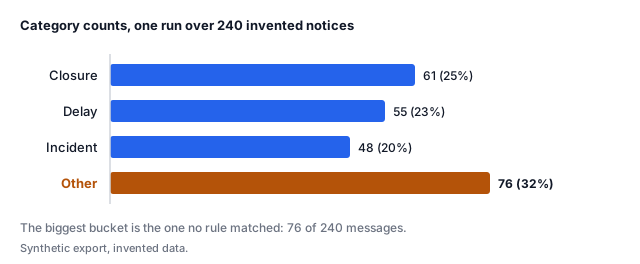
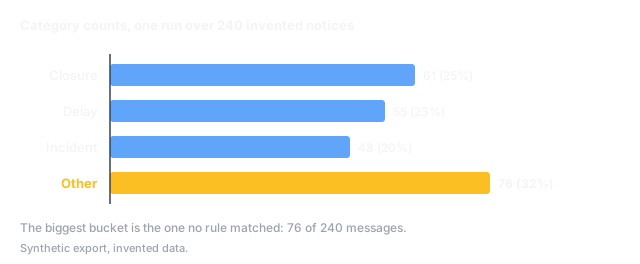
One run of the code above, with a small driver that reads the export and writes the CSVs, over a synthetic export of 240 invented notices:
$ python channel_to_csv.py export.json
read    export.json  (240 messages)
wrote   output/20261011-133914/messages.csv   240 rows
wrote   output/20261011-133914/events.csv     240 rows

category counts
  Closure    61  (25%)
  Delay      55  (23%)
  Incident   48  (20%)
  Other      76  (32%)
What it can’t do
It matches strings. It does not read.
Other, and Other is where things go to be
missed. Matching is on raw substrings, so a keyword inside a longer word matches too. And
first-rule-wins gives every message exactly one label, however many things it is about.It does not cross a language boundary
Other — a tidy CSV, empty of findings, identical to what an archive
with nothing in it would produce. A model would at least have noticed there was text
there.It is a pointer at a pile, not an answer
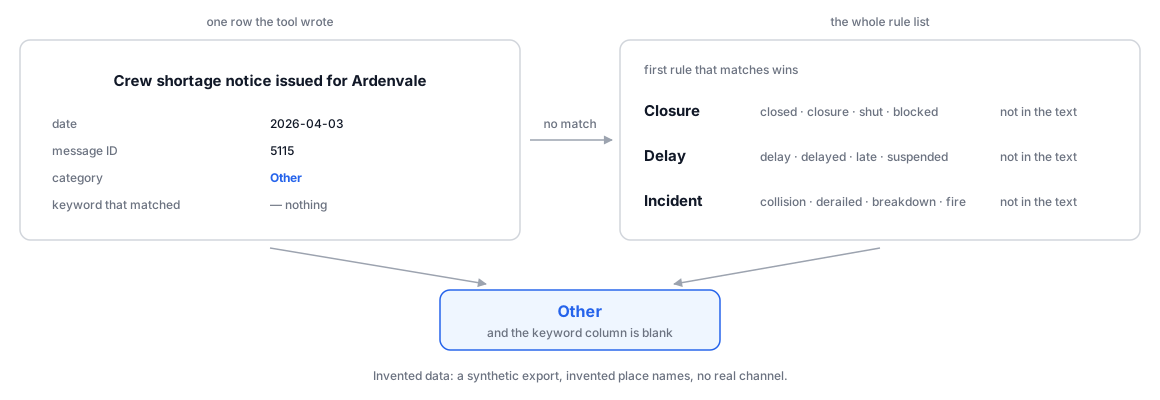
One of the 76 Other rows from the run above, beside the list that failed to match it:
Where this sits in the series
This is stage 4 of the 6-stage spine with the AI taken out of it.
Where AI actually fits argues that a model belongs on jobs where being roughly right is still useful, because a person reviews the output anyway. This tool is the counterweight. Every one of those jobs has a dumber version, and the dumber version is worth trying first.
The test I use now: can I write down the rule? If I can, I write down the rule. A model earns its place on the jobs where the honest answer is no.
One property I would keep in any version of this, model or not: every labelled row carries the ID of the message it came from. A label with no way back to the original is an assertion.
The claim that rules are explainable is only worth something if you also know how well they work. Does your AI step actually work? is the measurement half of this post’s argument, and it uses a rule-based step exactly like this one as its worked example of a failure.