
The Analyst's Stack Part 19 of 22
Running AI locally
Sooner or later someone who has read the do’s and don’ts asks the question that follows from them:
The material on my desk is not mine to publish. Can I use a model on it at all?
You can, if the model runs on your machine. This post is what that costs, what you get, and — with real measurements — where it stops being good enough.
The reason, and it is not the money
Local models get sold on price. That is the weakest argument for them.
The real one is that source material you did not publish should not go into somebody else’s API. The do’s and don’ts treated that as a disclosure decision, and that is exactly what it is. A leaked document, a source’s messages, an unpublished draft, a dataset about identifiable people: send any of those to a hosted model and they have left your control. They sit on hardware you do not own, under a retention policy you probably have not read, reachable by anyone who can compel the company holding them.
For a public web page, fine. For material somebody trusted you with, this is not a preference about tooling. It decides whether you get to use a model on that material at all.
The other reasons are smaller and still real. No per-token bill, so the backfill nobody budgets for — the 18 months of archive you want to process the week after the pipeline finally works — costs electricity instead of an invoice. No rate limit. It works on a train with no signal.
And one that sounds administrative and is not. The model version stays where you put it. Same input, same answer, or you cannot defend it later is hard to honour against a hosted endpoint that gets updated underneath a stable name. A local model is a file on a disk. Keep the file and you can re-run March’s classification in September and get March’s answer back — the difference between a method and an anecdote.
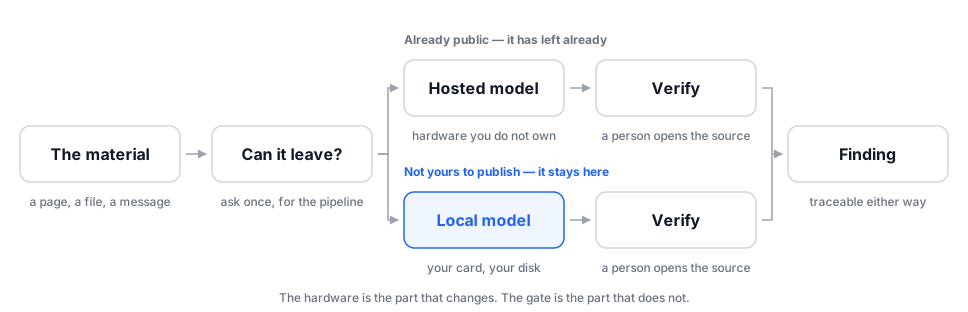
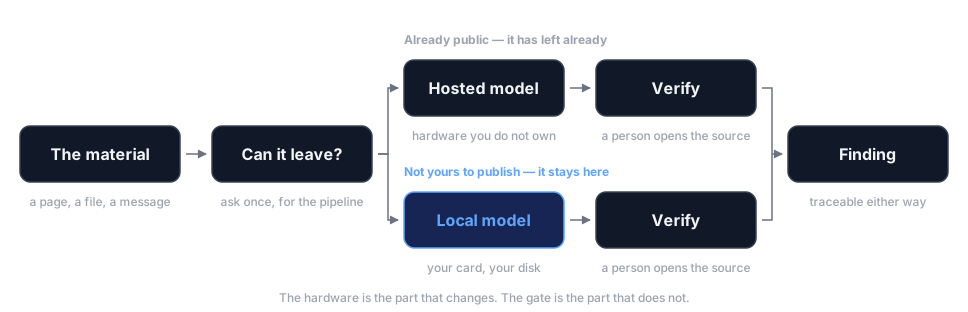
The gate is on both branches on purpose. Running a model on your own hardware changes who can read your material. It changes nothing about whether the output is true.
The setup, in about ten minutes
You need 3 things: a runner, a model, and one request.
The runner is a small program that loads models and answers requests on your own
machine. I use Ollama. Install it from its own download page, and it starts listening on
127.0.0.1:11434 — a loopback address, meaning a network address that never leaves the
computer it is on. That single detail is the entire privacy argument, expressed in
configuration.
Then pull a model and talk to it:
ollama pull <a small instruct model>   # a few GB, downloaded once
ollama list                            # what you have, and how big each one is
ollama run <that model> "Give me the three dates mentioned in this text: ..."
Here is part of what ollama list reports on my machine. This is what happens to be
installed today, not the set the benchmark below was run on; those models stay anonymous in
this post. The full list is longer, so grep trims it to fit here:
$ ollama list | grep -E '^(NAME|granite4\.1:3b|qwen3-embedding:|gemma4:|gpt-oss:120b)'
NAME                       ID              SIZE      MODIFIED
gemma4:latest              c6eb396dbd59    9.6 GB    13 days ago
gemma4:26b                 5571076f3d70    17 GB     5 weeks ago
granite4.1:3b              6fd349357287    2.1 GB    8 weeks ago
gpt-oss:120b               a951a23b46a1    65 GB     8 weeks ago
qwen3-embedding:8b         64b933495768    4.7 GB    8 weeks ago
For anything in a pipeline you want the second form — an HTTP request, so the model step looks like every other step:
import requests

def ask_local(prompt, model="my-small-model"):
    """One request to a model on this machine. 127.0.0.1 is the point."""
    r = requests.post(
        "http://127.0.0.1:11434/api/generate",
        json={
            "model": model,
            "prompt": prompt,
            "stream": False,
            "options": {"temperature": 0, "num_ctx": 8192},
        },
        timeout=300,
    )
    r.raise_for_status()
    return r.json()["response"]
temperature: 0 pins the randomness setting the do’s and don’ts tell you to record.
num_ctx is how much text the model looks at in one go — 8,192 tokens is roughly 6,000
words, and it is what every measurement below was taken at.
The hardware bill is VRAM (the memory on your graphics card, separate from your computer’s main memory; a model has to fit inside it to run at full speed). Measured: a 3-billion-parameter model occupied 7 GB, a 14B about 18 GB, a 26B 21–23.5 GB. A laptop with 8 GB of VRAM runs the first of those, and the first of those wins one of the 5 tests below outright.
Credit where it is not mine
Two of the tools in this post are other people’s work and I want that stated plainly. Ollama is not my project. Nor is the small desktop tray utility I use to start, stop and switch between local models — I have contributed 2 commits out of 10 to it, and it is designed and maintained by somebody else. I use both daily. I did not build either.
This matters beyond politeness: a series about evidence chains cannot be casual about attribution in its own copy.
What the measurements are
Everything below comes from one benchmark I ran on my own hardware: 5 local models across 5 task shapes, graded 1 to 5 by me against written criteria, one sample per model per task, at a fixed context size, with each model run alone on the card.
One sample per cell. Read the grades accordingly: a 5 and a 4 in the same column is not a meaningful gap. A 5 and a 1 is — which is why the failures get more space below than the wins.
The card is a workstation GPU with roughly 96 GB of VRAM, far more than most people have. Read the timings as relative, not as what your laptop will do.
What they are genuinely good enough for
Retrieval from a long document
This is the headline and it surprised me.
The test: a 3,006-word document, about 4,600 tokens, with 3 specific facts planted at 15%, 55% and 90% of the way through. Find all 3, exactly, without inventing anything.
Of the 5, 4 returned 3 out of 3, exactly correct, no fabrication. The fifth got all 3 right too and lost a point for a formatting breach. The fastest was the smallest model in the fleet: 0.5 seconds, on 7 GB of VRAM.
Size buys nothing on this job. That makes “pull the relevant paragraph out of this 40-page filing” an essentially free local operation, and it is the one on this list that pays back most, because it is the one you do 50 times a day.
Bulk classification and tagging
The same small model ran at 320 to 340 tokens per second, loaded in 8.9 seconds, and left about 90 GB of the card free. At that throughput a queue of thousands of items is an afternoon of unattended work with no bill attached.
This is the shape where AI fits called triage: sort the pile so a person reads the promising end first, never delete, keep the low-scored items on screen. Local fits it because the failure mode is a shortlist in a slightly wrong order rather than a false claim.
Translation, to decide what to read
Two of the 5 models produced publishable English from Arabic. One took 11.4 seconds; the other took 1.3 seconds and was just as accurate on every figure. A third was accurate throughout and lost a point only for stiff phrasing.
There is one caveat the benchmark makes unavoidable. The small model that was brilliant at retrieval scored 2 here. It turned a distance of 2.5 kilometres into “one and a half kilometres” and described a double fence as separating service lanes when the source said the opposite. Size buys you something on translation and nothing on retrieval, and you cannot reason from one to the other — which is the argument for measuring rather than guessing.
The same rule still holds: you translate to decide what to hand a person, never to quote.
Summarising text you supply
The most fragile shape in the whole benchmark, so treat it with the least trust.
Only one model of 5 reached a 5 on a 3-bullet summary of a news article: faithful figures, correct grammar, format obeyed. Three others were graded 3, each with a different factual drift. One moved a dump site from 12 nautical miles offshore to 11. One asserted that sediment had been “proven to contain heavy metals” when the article said the opposite, that levels were within permitted limits — a fabrication of exactly the kind that gets a correction published.
Summarise locally to sort your own reading. Not into anything that leaves your desk.
Where they fall short, measured
Three specific failures from the same benchmark. These are the most useful paragraphs in this post, because each one is invisible in the output.
It silently dropped 3 of 4 required fields
I asked all 5 models for entity extraction into a strict schema: people, organizations, locations, dates. Raw JSON only, no commentary.
The 3B model returned a valid JSON object containing dates — and nothing else. people,
organizations and locations were not empty lists. They were absent. Grade 1.
Consider what that does downstream. Code reaching for data["people"] crashes, which is
the good outcome. Code reaching for data.get("people", []) — what a careful programmer
writes — gets an empty list, records zero people, and moves on. The pipeline stays green,
every document has no people in it, and nothing anywhere says so.
When I went back to reproduce that failure for this post, it did not happen. The same model, the same 4-key schema and instruction, an invented news item, 5 fresh runs:
$ python3 retry.py
asking for 4 keys: people, organizations, locations, dates
  run 1: 4/4 keys returned  complete
  run 2: 4/4 keys returned  complete
  run 3: 4/4 keys returned  complete
  run 4: 4/4 keys returned  complete
  run 5: 4/4 keys returned  complete
That is worse than a reliable fault, not better. A model that fails every time is one you catch on your first test. A model that fails occasionally passes your spot-check, ships, and drops fields on the days nobody is looking. So the lesson is not that this model is unreliable — it is that a schema check has to run on every response, not on a sample. Sampling is what missed it here.
The fix is not a better prompt. It is validating every response against the schema and treating a missing key as a failed run.
It dropped a leading digit
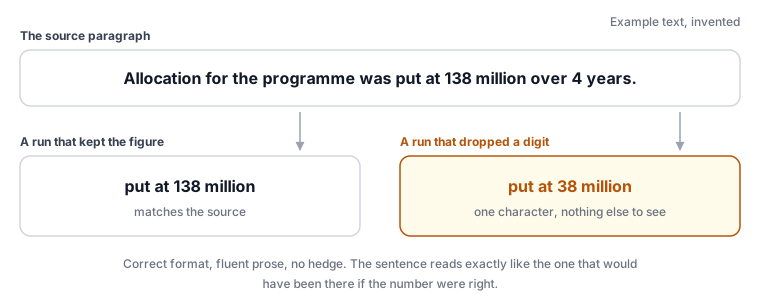
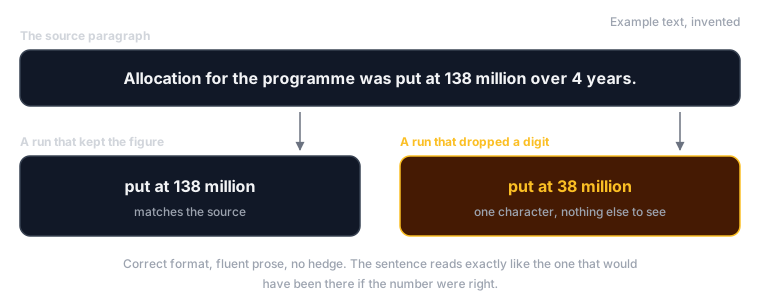
On the Arabic summarisation task the 14B model produced 3 correctly formatted bullets in fluent prose, and rendered the article’s headline figure of 138 million as 38 million. Graded 2, and the grade is generous.
There was no hedge, no malformed output, no sign of strain. The sentence reads exactly like the sentence that would have been there if the number were right. A reviewer skimming for tone finds nothing wrong with it, because nothing is wrong with it except the fact.
A different model in the same benchmark corrupted a string in a comparable way: it turned a lowercase l into the digit 1 inside an organisation name — a one-character change that would break every downstream join that name participates in, silently, while the extraction itself reports success.
Numbers and proper nouns are where models fail most and where verification is cheapest. Check every figure against the source. That is a rule with a measurement behind it now.
The code compiled cleanly and rejected every valid input
I gave all 5 models a written spec for a small parser: read a fixed-format message line, check its checksum, split its fields. Then I ran the results through a strict compiler and 11 functional test cases.
Of the 5, 4 compiled clean. One passed the tests.
The coder-branded model compiled, passed 8 of 11, and had invented a validation rule the spec never mentioned: it required the payload to be hexadecimal, when the format’s payload is a different encoding entirely. Every real message failed it. The largest model made the same class of mistake with a different invented rule — a field required to be non-empty when empty is the normal case. Also 8 of 11, also rejects genuine traffic. The 14B managed 7 of 11 and was broken in a way that meant no valid input parsed at all.
Four models produced code a compiler pronounced correct, and 3 of those 4 silently refuse real data. Compilation is not correctness. Locally generated code needs a functional test against real input before you trust one row of its output.
A fourth failure is blunter. The largest model leaked its own visible reasoning into the output on 3 of 5 tasks — paragraphs of “let me go through each sentence again” wrapped around the answer. Largely right, entirely unusable, because every format contract downstream broke on them. It scored 3.2 out of 5, tied with a model a seventh of its size.
The one-line version
The operational facts that actually decide it
Capability is not what makes or breaks a local setup day to day. Two numbers and one consequence do.
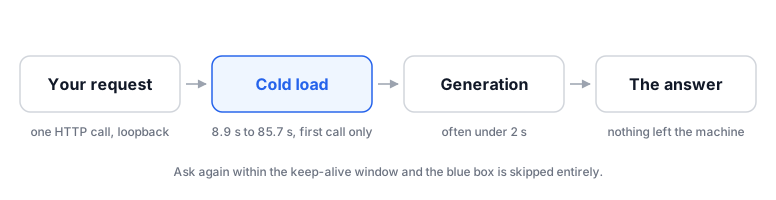
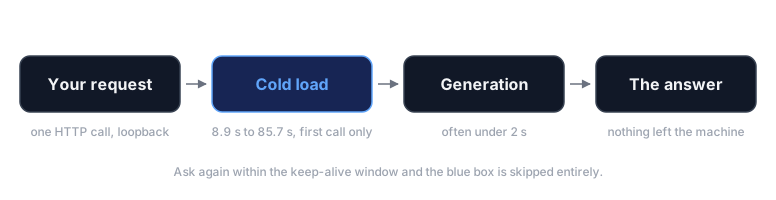
Cold load. The first request after a pause pays to read the model off disk into the card. Measured: 8.9 s for the 3B, 14.1 s for the 14B, 19.5 s for the 26B, 51.3 s for a 50 GB model and 85.7 s for the largest. Generation itself was often under 2 seconds. That ratio is the whole scheduling argument: a big model is worth loading for a batch of 500 documents and absurd for one short question.
VRAM footprint. Measured on the card: 7 GB, 18 GB, 21–23.5 GB, 50 GB and about 94 GB for the 5 models. The practical reading is that the small one leaves roughly 90 GB free and the large one leaves nothing.
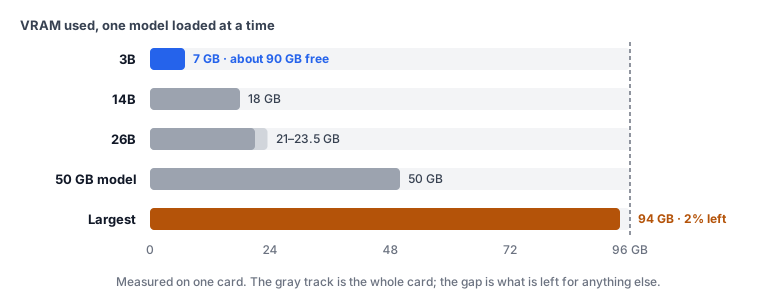
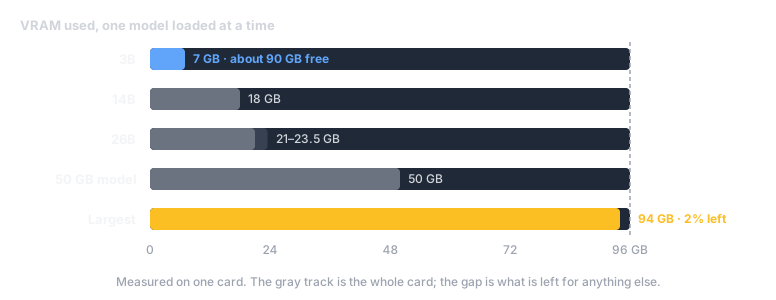
A large model can leave room for nothing else. This is the finding I did not expect to matter and now plan around. The largest model occupied 95,875 MiB of 97,887 available — 2,012 MiB of headroom, 2 per cent. It ran entirely on the GPU with no slowdown, and while it was loaded the card was full. No second model, no other job, and no larger context window: 8,192 tokens was near its ceiling, so a longer document would spill onto the CPU and collapse its speed.
That reshapes how you build. If the pipeline wants a translation model and a classification model resident at once, 2 small models that fit together beat one large one that does not — and the small one wins the retrieval task anyway.
What local does not buy you
It does not hand you a frontier model. The best local result here was one model with a mean of 4.8 across 5 tasks, and that average sits on single samples. On long, messy reasoning — the shape where hosted models are still clearly ahead — local is the weaker instrument and pretending otherwise helps nobody.
You become the operator. Nobody patches the model for you, nobody notices when a driver update breaks the runner, and nobody is on call when the card is full. The bill moved from a card statement to your afternoons.
It protects the material from a vendor, not from everything. A model on your machine removes one disclosure path. It does nothing about a compromised laptop, a synced folder, a backup, or the most common leak of all — pasting the local model’s output into a hosted tool to tidy it up. The boundary only holds if the whole pipeline respects it.
The measurements are mine, not yours. One sample per cell, one card, one set of fixtures, one date. Model releases move faster than this post will age. Use the method — 5 task shapes, written grading criteria, your own material — and get your own numbers.
Where I would start
Pick the retrieval job. Take the longest document you read this week, run the smallest model that fits on your card, and ask it for 3 specific facts you already know are in there. A minute later you will know whether this is useful to you — and you will have found out on material you were never going to send anywhere.
Then do what the first post asked and write the step down, one line per stage. A local model is stage 4 and nothing else: a private first pass whose failures are silent. Treat its output as a draft.