
The Analyst's Stack Part 20 of 22
Reaching sources that block you
Here is the moment this post is about. You open a page in your browser and it is there. You fetch the same URL from a script and you get nothing, or a wall of text you did not ask for, or a page the server says it delivered perfectly that contains none of the words you can see on your screen.
The next thing most people do is look for a proxy.
That is almost always wrong, and expensively so, because a proxy (a service that makes your request arrive from somewhere other than your own connection) fixes exactly one of the 6 things that produce that symptom, sometimes helps with a second, and does not touch the other 4. Some of them it makes worse.
So this post is a decision tree, cheapest branch first. Most of its value is in the first section, because the diagnosis is the part people skip.
Work out what is actually blocking you
Before anything else, look at the reply. Not the browser’s rendering of the reply — the reply. Status code, response headers, and the first few hundred bytes of the body.
curl -i -sS --max-time 20 "https://example.test/page" | head -40
-i prints the status line and the headers before the body. Reading that output
separates the 6 cases below, and I have watched people lose an afternoon to a
problem the first line of the response had already named.
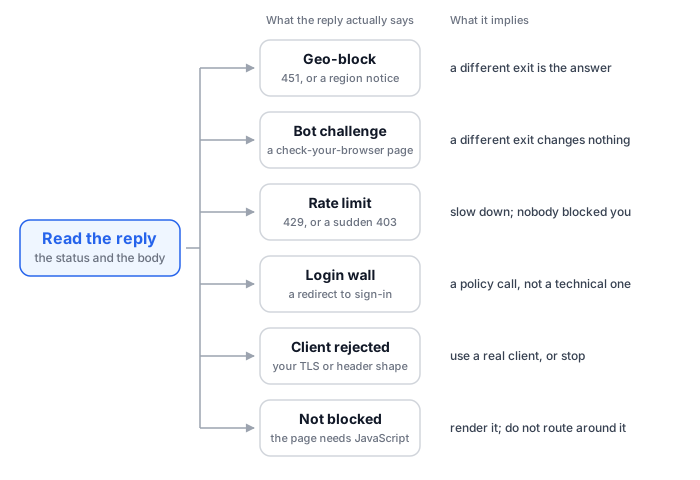
A hard geo-block. The status is 451, or a 403 whose body is a short notice in plain language about your region. It happens on the first request, instantly, every time, and the text reads like it was written by a lawyer rather than a security product. This is the one case in this whole post where routing is the honest answer, and I will come back to it.
A bot-detection challenge. You get a page, often with a 200 or a 403, and the page is not your content. It is an interstitial: checking your browser, a puzzle, a box to tick, a short script that expects to run and set a cookie. The service deciding this sits in front of the site, and it makes its decision from what your client looks like, not from where it is. Move to another country and the same challenge is waiting for you there.
A rate limit. The classic status is 429, but a sudden 403 after a run of
successful requests is the same thing wearing a different number. The tells are that
the first requests worked, that a Retry-After header may be present, and that
waiting fixes it. This is not a block. It is the source telling you your pace is a
problem, in the only vocabulary it has.
A login wall. A redirect to a sign-in page, or a 401. Nothing is broken. The content is behind an account, and whether you may put an account in front of a script is a question about terms and about your own rules, answered before you write any code. The OPSEC post (part 5) has a section on what a logged-in session costs you, and it is the sharpest edge in this business.
A client-fingerprint rejection. You get a connection reset, an empty body, or an unexplained 403, while the same URL in a browser on the same network and the same connection loads fine. The OPSEC post covers why in detail: what arrives at the far end goes well beyond your address. The exact set and order of your headers, the shape of your encrypted handshake, what you do with cookies and redirects, and the dozens of follow-up requests a browser makes and a script never does. Changing your exit does nothing here, because the country was never what was being read.
A page that is not blocked at all. This is the most common of the 6, and the biggest time sink. The request succeeds. The response is a respectable size. Your content is not in it, because the page ships a near-empty shell and a pile of scripts, and the text only exists after those scripts run in a browser.
The 5-second test for that last one
Pick a distinctive phrase you can see on the rendered page. Search the raw response
for it — curl -s "$URL" | grep -c "that phrase". Zero means the content was never
in what the server sent you, and nothing about your network is involved.
Do this with view-source, not with the inspector. The inspector shows you the DOM (the live page after scripts have run), which is exactly the thing you are trying to rule out.
The cheap fixes, in order
Work through these before touching anything else. On real sources they resolve the majority of cases, and every one of them costs nothing.
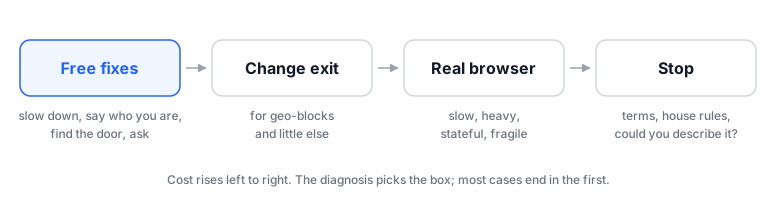
Slow down. If the diagnosis was a rate limit, this is not a workaround, it is
the instruction you were given. Honour Retry-After when it is there. Back off when
it is not (wait longer after each failure rather than retrying at the same pace).
Then push on the interval itself, which the OPSEC post argues is almost always
set by feel rather than by need.
Say who you are. A tool name, a version, and a contact address in your
User-Agent, as in the first workflow
post:
HEADERS = {
    "User-Agent": "research-monitor/1.0 (analyst@example.test)",
}
An unexplained pattern gets blocked. An identified one sometimes gets a reply, and occasionally the reply arrives with an export attached, which is better than anything a scraper assembles.
Look for the door you walked past. Before deciding a source is hostile, check
whether it publishes an API, an RSS or Atom feed, a sitemap, a CSV or JSON download,
a data portal, or a research access route. Check the footer, the /robots.txt, the
documentation link nobody clicks. A surprising number of sources that appear to
resist scraping are running a documented API with a rate limit and no key required,
and the resistance you hit was a side effect of asking the wrong way.
Ask. For a public body, for an academic project, for many smaller publishers, an email to a contact address is a faster route to the whole dataset than any engineering. It also puts your collection on a footing you can describe in print, which matters more than it sounds.
Changing where you come from
Now the part everyone jumps to. Before the how, the where.
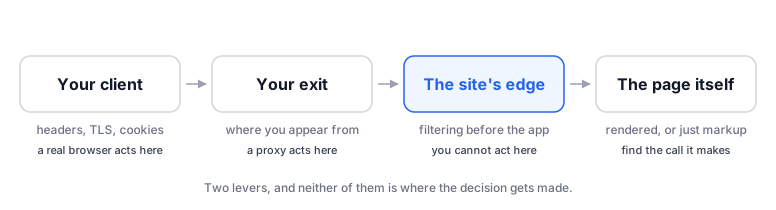
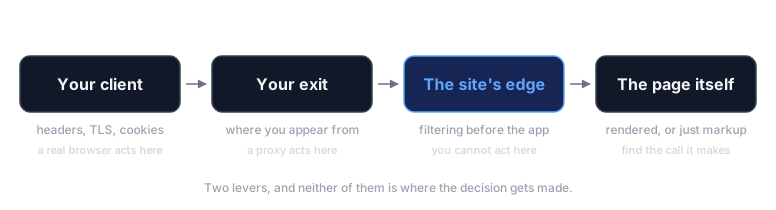
A proxy or a VPN changes 2 things and no others: the address your request appears to come from, and the reputation that address carries. That is the whole of it.
It is genuinely the answer when the diagnosis was a hard geo-block — the source serves one thing inside a region and another outside it, and no amount of politeness changes that. It sometimes helps a second case: whole ranges of data-centre addresses are blocked wholesale by some sites, so a request that leaves from a commercial hosting provider is refused before it says anything else. Coming from a consumer-shaped network instead can be the difference.
It changes nothing at all for the other 4. A bot challenge fires regardless of country, because the challenge is reading your client. A JavaScript-rendered page renders the same way from anywhere. A login wall is a login wall. And a rate limit attached to an API key or an account follows the key or the account, not the network — routing around it is not a fix, it is an attempt to evade a limit you were told about, which is a different act with different consequences.
The line this post exists to carry
Changing your exit IP is not permission to send personal data anywhere.
Routing changes which network your request comes from. It changes nothing about what you may collect, what you may hold, or what you may transmit. A proxy is not consent, it is not a legal basis, and it does not make an onward transfer acceptable. Those questions have separate answers, and none of them are affected by which country your packets left from.
I want to be exact about the credit here, because it matters for the rest of this series.
Tools used, not tools built
The provider I pay for is a commercial VPN service I am a customer of and have no other relationship with. Around it I wrote a small personal wrapper that picks a working exit for a given site and then gets out of the way: a convenience layer over somebody else’s service, not a product and not an achievement.
What my own routing actually looks like — which exits, which intervals, which configuration — stays out of this post, for the reasons the OPSEC post spends a couple of thousand words on. This section is about the class of problem.
Two costs worth naming. Plenty of sites block known VPN and data-centre ranges outright, so you can swap a working connection for a blocked one. And an exit that many strangers share carries their behaviour with it, so you inherit a reputation you did not earn and cannot inspect.
Here is the shape of that reply, from a small demo server on loopback that answers the way a region-blocked site does. First a scripted request:
$ curl -i http://127.0.0.1:8451/article
HTTP/1.1 451 Unavailable For Legal Reasons
Server: demo
Date: Wed, 23 Sep 2026 20:36:58 GMT
Content-Type: text/plain; charset=utf-8
Content-Length: 145

451 Unavailable For Legal Reasons

This content is not available in your region.
We are unable to serve visitors from your country at this time.
Then the same address opened in a browser, which gets the human-readable version:
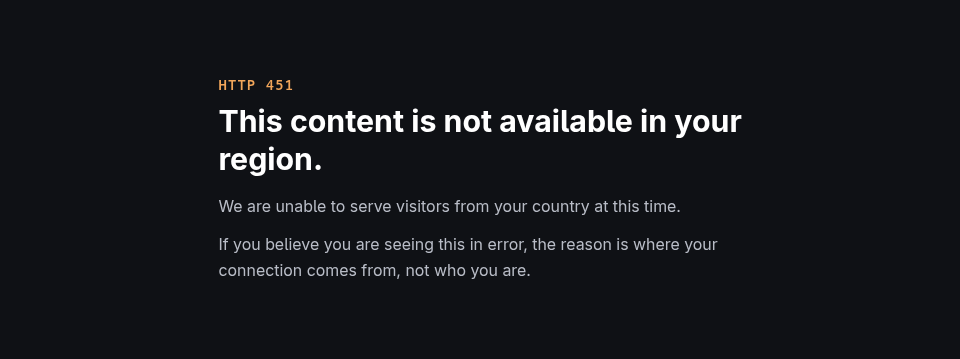
The same request twice, against the same loopback demo server, changing nothing but the exit:
$ python3 fetch.py --exit Germany /article
HTTP/1.1 451 Unavailable For Legal Reasons
$ python3 fetch.py --exit "United States" /article
HTTP/1.1 200 OK
--exit only picks which local address the request
leaves from. No proxy was used.When the page genuinely needs a browser
Some pages only exist once scripts have run. For those, there are 2 honest options, and the second is much more expensive than the first.
Find the call the page makes. Open the network tab in your browser’s developer tools, reload, and watch what the page requests after the initial document. Very often one of those requests returns your content as clean JSON, with no markup to strip, from an endpoint you can call yourself. That is a better result than scraping the rendered page: faster, stable across redesigns, and fields instead of text you have to parse back into fields. Check what that endpoint’s terms say before you build on it, because an undocumented internal API is not the same as a published one.
Drive a real browser. When the interaction genuinely cannot be reduced to a request — a flow with steps, content that loads as you scroll, a rendering you need to see rather than read — you automate an actual browser. It works, and it costs 4 things that a scripted request does not:
- Slow. Seconds per page rather than milliseconds. A job that took 4 minutes takes an hour.
- Heavy. A browser process per worker, with the memory that implies. This is the difference between something that runs on a spare machine and something that needs a real one.
- Stateful. Cookies, storage, a profile that accumulates. That state is useful and it is also a liability, because it persists across everything you do with that profile.
- Fragile. Your code now depends on where things are on a page. A redesign breaks it, usually silently, which is the failure mode the first post in this series warns about at length.
Credit, again
One caution, and it is the one from the OPSEC post. A real browser session is the heaviest footprint you can leave. Logged in, it is heavier still, because a platform that sees you as an account keeps a history rather than a log line. If you reach for a browser, reach for it on a public page first, and treat an authenticated one as a separate decision with separate consequences.
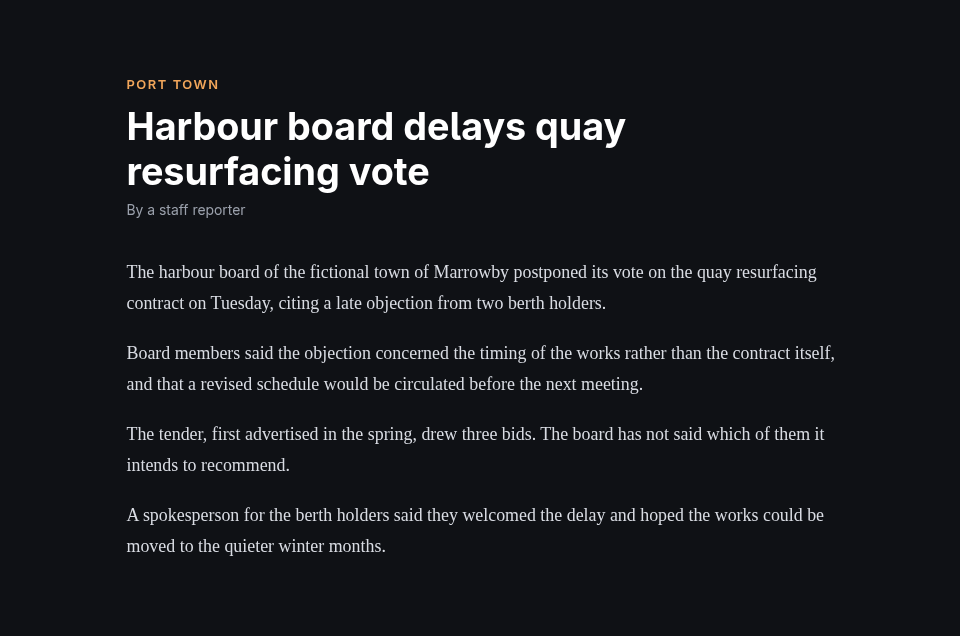
Here is that situation on a demo page I control, served from loopback. This is everything the server sends, and a search of it for a phrase from the article’s first paragraph:
$ curl -s http://127.0.0.1:8453/
<!doctype html>
<html lang="en">
<head>
<meta charset="utf-8">
<title>Harbour Gazette</title>
<link rel="stylesheet" href="/app.css">
</head>
<body>
<div id="app"></div>
<script src="/app.js"></script>
</body>
</html>
$ curl -s http://127.0.0.1:8453/ | grep -c "postponed its vote"
0
And the same address in a browser, after the page’s script has run:
What this post does not do for you
It does not tell you whether you are allowed. Nothing here is legal advice, the rules differ by country and by the kind of organisation you work for, and a method being technically available says nothing about whether you may use it.
It deliberately contains no evasion recipes. Telling the 6 categories apart is the useful and publishable part. The specifics of defeating a detection product are neither, and a post that shipped them would age into a liability within months.
It does not make a blocked source collectible. Some of the 6 have no technical answer, and for 2 of them the correct next step is a request, a conversation, or nothing at all.
And it will go stale. The status codes and the shape of the diagnosis are durable. Which products behave in which way is not, and I would rather you learned the sorting than memorised the current landscape.
When to stop
The last branch of the tree is the one with no code in it.
A source that has taken active measures against automated access has told you something. Not always “go away” — sometimes it is a bill they are trying not to pay, or a product they bought that is doing more than they asked for. But it is information, and the fact that you can get past it is not an answer to it.
Four things to settle before you write anything, in this order.
The terms. Read them. They are short, they are usually specific about automated access, and reading them takes less time than the workaround you were about to build.
The rules where you work. Newsrooms, research institutions and investigative teams generally have a position on this, and it is generally stricter than what the law technically permits. Find out what yours is before you are explaining a decision after the fact rather than before it.
Public page versus login. This is the distinction I would hold onto hardest. Fetching a page that anyone can load without identifying themselves is one kind of act. Using an account to reach something that is not otherwise available is a different kind, because an account involved an agreement and a claim about who you are. The technical gap between them is one header. The gap in what you have done is much larger, and no tool in this post narrows it.
Whether you could describe it. The practical test, and the one I actually use: if this material ends up in something you publish, will you be comfortable writing down how you obtained it? If the honest answer is that the method would need to be left vague, the method is the problem, and finding that out now is cheaper than finding it out in a correction.
None of that is a technical constraint. That is why it is here rather than in the tooling, and why the first post in this series puts unsettled legal ground on the list of reasons not to automate at all.
The OPSEC post argued that the fix for most collection problems is to slow down rather than to hide better. This one is the same argument with the walls added: of 6 things that look like a block, one is answered by routing, one by slowing down, and one was never a block. The other 3 are answered by a real browser, by a conversation, or by deciding not to. The proxy was never the interesting part.