
The Analyst's Stack Part 5 of 22
OPSEC for automation
Something happens about 3 weeks into running your first monitor. You stop thinking about it. It runs, it messages you when something appears, and you forget it exists, while it goes on knocking on somebody’s server every 15 minutes for the next year.
That is the whole of this post in one sentence:
The line this post is built on
Checking a source by hand has an OPSEC property (operational security — the habit of not handing an adversary information about what you are doing) that nobody designs in and everybody benefits from. It is irregular. You check twice on Tuesday, not at all on Wednesday, 4 times on Thursday because something was happening. The volume is small and the rhythm is human.
Automation removes all of that at once. What replaces it is regular, consistent and indefinitely persistent — the combination that makes a thing easy to recognise and easy to find again a year later in a log file.
That is not an argument against automating. It is an argument for knowing what you emit, because most analysts I talk to have never thought about the outbound half.
What a server actually sees
Throw away the idea that you are identified by your IP address. Your IP is one field in a larger picture, and it is the field that changes most easily, which is why people fixate on it.
Here is what actually arrives at the other end when your script makes one request.
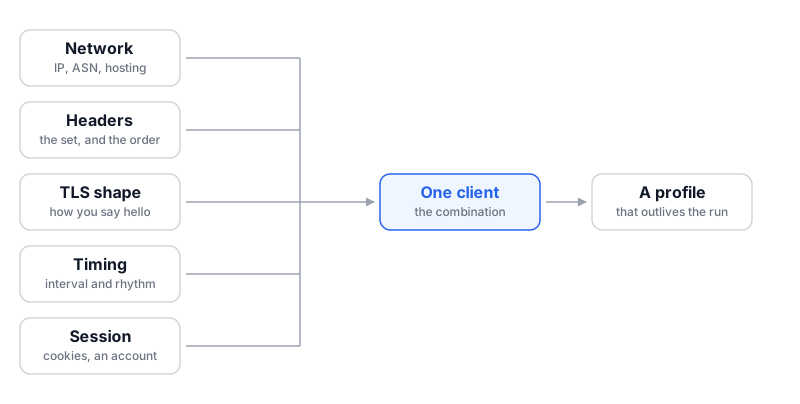
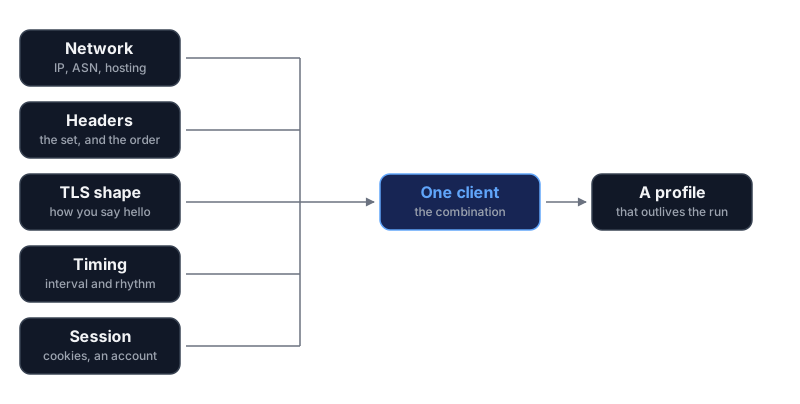
The network you sit on. Not the address alone, but what kind of address it is: residential, university, mobile carrier, or data centre. Which operator owns it (your IP belongs to an ASN — a numbered block of addresses assigned to one organisation, and it is public which organisation that is). A request from a cloud region is not anonymous. It is labelled “automation” before it says anything else.
The exact set of headers you send, and the order you send them in. A request carries a handful of small metadata lines: what you claim to be, what content types you accept, what languages you prefer, what compression you understand. Real browsers send a particular set, with particular values, in a particular sequence, and differ from each other in stable, well-documented ways. Most programming libraries send a shorter set in a different order. The order alone often separates “a browser” from “a program” before anyone reads the values.
The shape of your encrypted handshake. Before any of that is sent, your client and the server negotiate an encrypted connection (TLS — the layer that puts the “s” in https). That negotiation happens in the clear and it is chatty: which encryption methods you offer, in what order, which optional extensions you support, which you leave out. The opening message is stable per client library and differs between libraries and browsers. You cannot edit it from inside your script, because the layer underneath produces it.
What you do with cookies and redirects. A browser keeps the small identifiers a site hands it and sends them back next time, follows a redirect, and picks up whatever the new page sets. A script written by someone not thinking about it does neither, or does one and not the other, and behaves like nothing that has ever had a human in front of it.
What you do not request. This is the one people miss entirely. Loading a page in a browser produces dozens of follow-up requests: stylesheets, scripts, fonts, images, an analytics call or two. A scraper asks for the document and leaves. From the server’s side that is a distinctive silence — the page was served and nothing was ever drawn.
A fingerprint is a combination
This is the part worth internalising, because it explains why so much amateur counter-fingerprinting achieves nothing.
None of the signals above identifies you on its own. Millions of people share your network operator. Thousands of tools send the same headers. The identification comes from the joint pattern: this network, plus this header set in this order, plus this handshake shape, plus this timing, plus this cookie behaviour, arriving together and doing so again tomorrow.
Which means a change to one element usually changes nothing.
The classic version is the User-Agent (the header where a client states what
software it is). Someone reads that scrapers get blocked, copies a real browser’s
User-Agent string into their script, and reruns it. It fails in exactly the same
way. They are now a client that claims to be a browser, sends library headers in
library order, negotiates encryption like a scripting library, ignores cookies, and
never once asks for a stylesheet. The declared string is the only part that matches,
and the mismatch between it and everything else is more distinctive than the honest
original was.
The general rule
A fixed interval is a tell
Now the timing, which is where automation gives itself away most cheaply.
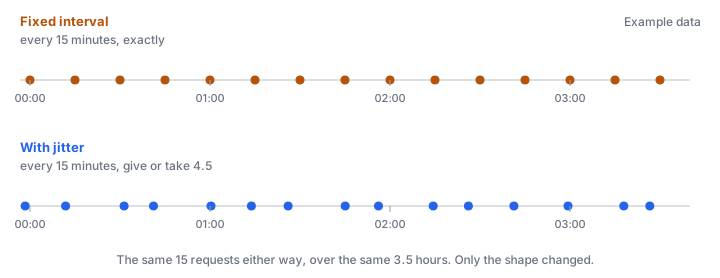
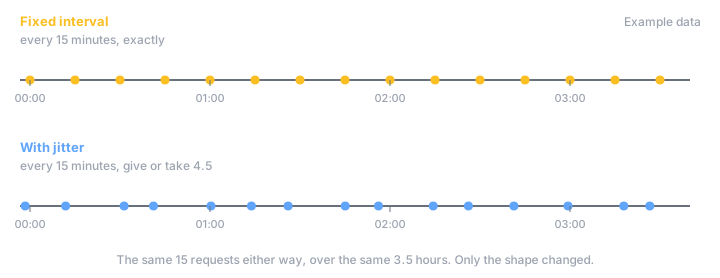
A job that runs at exactly :00, :15, :30 and :45 past every hour, forever, is not a person. It does not matter how convincing your headers are; a request arriving every 900 seconds with a variance measured in milliseconds is a scheduler, and anyone who plots request times against a source sees a straight line of dots the moment they look.
The fix is small. Add jitter (a random offset added to a scheduled time, so runs land at slightly different moments). Instead of every 15 minutes, run every 15 minutes give or take 4.5.
import random
import time

BASE_SECONDS = 900          # your nominal interval
JITTER_FRACTION = 0.3       # +/- 30% of it

def sleep_until_next_run():
    """Wait roughly BASE_SECONDS, never exactly BASE_SECONDS."""
    spread = BASE_SECONDS * JITTER_FRACTION
    delay = BASE_SECONDS + random.uniform(-spread, spread)
    time.sleep(delay)
Three lines, and the straight line of dots becomes a cloud. The average rate is unchanged: you collect the same amount, at an irregular cadence, which is what a human doing the same job would produce anyway.
There is a second reason to jitter, and it is the one I would lead with when asking a
colleague to do it. Fixed intervals synchronise. Run 4 monitors on a */15
schedule and all 4 fire together, so the source gets all 4 requests in the same second,
96 times a day, instead of spread evenly. Jitter smooths that out. It is
the polite version of the same change, and a better argument to make to a team than
the OPSEC one, because it holds regardless of who is watching.
The rhythm is information about your investigation
This is the part that goes beyond being identified as a bot, and it matters most in this work.
Suppose you watch 40 sources at a slow, even rate for months. Then something happens in a story you are working on, and you turn one of those 40 up to 10 times its usual rate for a week.
You have just announced an interest in that source, with a start date.
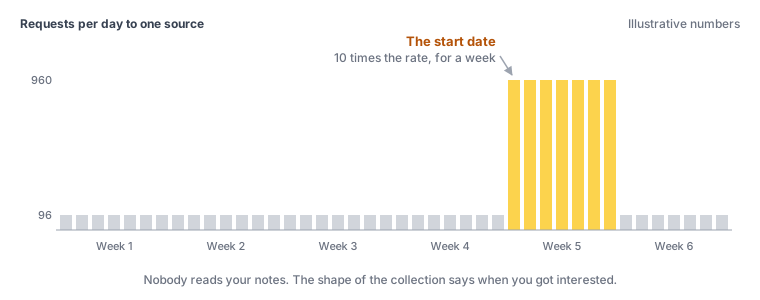
Nobody had to read your notes. The shape of your collection carried the information on its own. If the operator of that source is a party to what you are investigating, you have told them somebody started paying close attention on a particular Tuesday, and the gap between that and knowing who is smaller than it feels.
The same leak happens in other shapes:
- A cold start on a new source. You have never touched it, then you fetch every page on it in an afternoon. That is somebody who has just become interested, not an ongoing background process.
- Collection that follows the news. A monitor that quickens within hours of a public event correlates your activity to that event for anyone holding both halves.
- Collection that stops. Going quiet the week after you publish confirms that the earlier activity was about the thing you published.
The defence is not clever. Keep the baseline boring and keep it constant. If you can tolerate the latency, build the surge into the schedule from the start rather than introducing it when it matters.
Logged-in sessions are the sharpest edge
Everything above concerns an anonymous request. Automating through an account is a different category of exposure, and worth stating plainly because the convenience is so tempting.
Server logs are shallow. Account telemetry is deep. (Telemetry here means the activity data a platform records about a user, as opposed to the request data any web server records about a connection.) A platform that sees you as an unauthenticated request has a line in a log. A platform that sees you as a logged-in account has a history: every item you viewed and in what order, how long each view lasted, what you searched for, what you saved, which device and which network each session came from, and every other session that account has ever had. All of it tied to whatever identity the account was created with — a phone number, an email address, a payment method, or just a long enough history of logins from a network that is yours.
Three specific consequences.
Automation does not look like use. Human browsing has pauses, misclicks, and abandoned pages. Scripted browsing has none of those, and platforms have spent a decade learning to spot the difference because it is how they catch commercial abuse. Your research script meets detection built for somebody else and very good at its job.
Some platforms tell the other side. Depending on the service, viewing a profile, following an account, joining a channel, or opening a document can be visible to its owner. Automating that turns one glance into hundreds of notifications on someone else’s screen.
The account outlives the operation. A research account reused across 3 investigations links those 3 investigations to each other, permanently, in a record you do not control and cannot inspect. That is the failure that does real damage, and it happens through convenience rather than any technical mistake.
Before you automate anything behind a login
The correct fix is usually to slow down
Most OPSEC reading gets you excited about hiding. Hiding is the fourth option, and it is the expensive one.
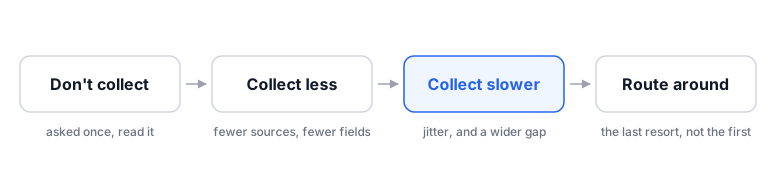
Do you need to collect this at all? The first post in this series has a whole section on when not to automate, and its first item is that a question asked once should be answered by hand. Opening the page yourself leaves a footprint of exactly one request.
Do you need this much of it? Fewer sources, fewer fields, fewer pages per run. The most common thing I see is a monitor fetching a full page every cycle when a much smaller resource — a feed, an index, a single endpoint — answers the same question. That is fewer requests, less bandwidth for the source, and less of you in their logs.
Do you need it this fast? This is the one worth pushing on, because the answer is almost always no and the interval was set by feel rather than by need. A 15-minute interval and a 6-hour one feel very different to build and are often identical in outcome, because the thing you are watching updates twice a week.
Ask what actually breaks if you find out 4 hours later. If the honest answer is “nothing”, you have cut your exposure by roughly an order of magnitude without configuring anything.
Only when those 3 are exhausted does routing make sense. A later post in this series covers reaching sources that block you outright, which is a different problem with a different answer.
One line to take into that later post
Being legible on purpose
One strategy runs opposite to all of this, and for a lot of research it is the right one.
In the first workflow post the example client identified itself honestly: a tool name, a version, and a contact address. That is not an oversight in an OPSEC post. If you are collecting from a public source, at a modest rate, for work you would be willing to describe, then being obviously a research tool with a way to reach you beats being an unexplained pattern. Unexplained patterns get blocked. Identified ones sometimes get a reply, and occasionally get an export.
HEADERS = {
    "User-Agent": "research-monitor/1.0 (analyst@example.test)",
}
The 2 strategies do not mix. Blending in and declaring yourself are both coherent; declaring yourself while also trying to look like a browser is neither, and it is where most people end up by accident. Pick one per source and write down why.
Here is what that looks like on a real run: a small echo server listening on 127.0.0.1, receiving one request from a plain Python script and then one from a real browser opening the same address.
$ python3 echo_server.py
listening on 127.0.0.1:8765

--- request 1 from 127.0.0.1 ---
GET / HTTP/1.1
Accept-Encoding: identity
Host: 127.0.0.1:8765
User-Agent: Python-urllib/3.14
Connection: close
(4 headers)

--- request 2 from 127.0.0.1 ---
GET / HTTP/1.1
Host: 127.0.0.1:8765
Connection: keep-alive
sec-ch-ua: "Brave";v="149", "Not_A Brand";v="8", "Chromium";v="149"
sec-ch-ua-mobile: ?0
sec-ch-ua-platform: "Linux"
Upgrade-Insecure-Requests: 1
User-Agent: Mozilla/5.0 (X11; Linux x86_64) AppleWebKit/537.36 (KHTML, like Gecko) Chrome/149.0.0.0 Safari/537.36
Accept: text/html,application/xhtml+xml,application/xml;q=0.9,image/avif,image/webp,image/apng,*/*;q=0.8
Sec-GPC: 1
Sec-Fetch-Site: none
Sec-Fetch-Mode: navigate
Sec-Fetch-Dest: document
Accept-Encoding: gzip, deflate, br, zstd
Accept-Language: en-US,en;q=0.9
(14 headers)
Host in the same place. Two values were altered before publishing — the
browser version and the language list — so the capture is not the capturing machine’s
own fingerprint; every header name, the count and the order are as captured.What none of this fixes
This post is about the signals your collection emits, and whole categories sit outside it.
It does not address what you are legally allowed to collect. Jitter is not consent, and a polite request rate does not make personal data lawful to accumulate. That question comes before the technical one, and the first post in this series says so at more length.
It does not address what happens to material after you collect it. Where the store lives, who can read it, what leaves your machine when a step calls a hosted model — real exposure, none of it on the diagram above.
It does not make you anonymous. Nothing here does. Reducing and irregularising your footprint raises the cost of noticing you; it does not take you off the network. If your threat model genuinely requires that nobody can attribute your collection, the answer is not a better scraper.
And it does not survive one careless run. Months of disciplined pacing are undone by a single afternoon of pulling an entire site as fast as it will answer, because that afternoon is the one that trips an alerting threshold somewhere.
The habit
Add one line to the notes you keep for each monitor, next to what it collects and where it stores things:
What does this look like from the other side?
Answer it in a sentence. A data-centre address, library headers, every 15 minutes give or take 4.5, no account, identifies itself. You will not always like the answer, and writing it down is what makes it changeable. An emission you have described is a decision; an emission you have never described is a habit that has been running since March.
That closes the foundations: what automation means, building the first one, where AI fits, the do’s and don’ts, and this. The methods half, later in the series, goes deeper, starting with how to build all of it without writing code.