
The Analyst's Stack Part 9 of 22
Matching 2 datasets to find the overlap
Deciding that 2 rows describe the same real-world thing is a judgement, and in this script it is made by 2 numbers. The script is about 60 lines; the 2 numbers took far longer.
Why I built it
Two datasets, collected separately, for different reasons, by different methods. One is a feed of alerts pulled automatically — each row has a timestamp and a coordinate. The other is a list of events compiled from a second source — each row has a date and a coordinate.
Nobody built these to be compared. They share no identifier — no reference number, no case ID, nothing you could join on the way you would join 2 tables. All they have in common is that some of their rows are describing the same thing in the world, and neither file knows which ones.
By hand, the work is dull rather than difficult: sort both by date, take a day, compare coordinates, decide. A minute or two per row, and the pile runs to thousands of rows. It is work that fails quietly in the fourth hour, when you stop reading numbers and start recognising shapes.
What it solves
It answers how much of the first dataset is accounted for by the second in a single run, and it answers it per row rather than only in total. Every alert comes back with 2 new columns: whether it matched, and which event row it matched. So the total is auditable — you can open any single claim and look at the pair it came from.
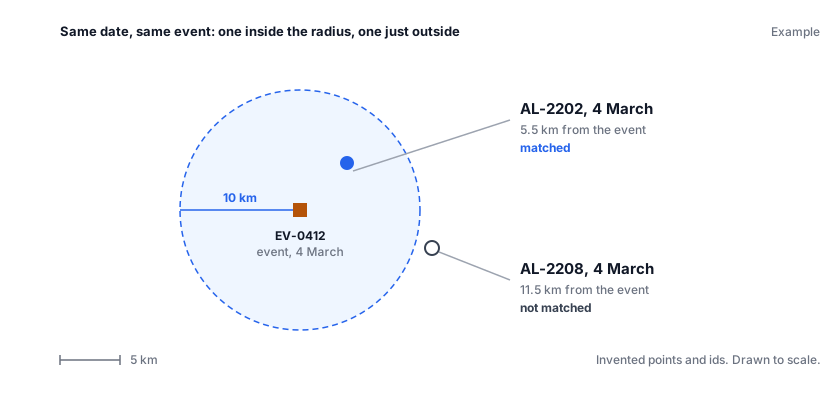
The only tuned number in the whole thing is the distance. Two rows are treated as the same thing if they carry the same calendar date and sit within 10 km of each other.
That sentence is the entire definition of “the same”, and both halves of it are choices. The 10 kilometres is a judgement about how precisely the 2 sources place things, and about how crowded the map gets on a busy day. Tighten it and you lose real pairs to coordinate imprecision. Loosen it and a single event starts absorbing everything that happened near it. I picked the number, I can argue for it, and I cannot prove it. Anyone reading the output needs to know it is a dial rather than a fact.
How it works


Collect. Read both files into memory. There is no API here and no database — the inputs are 2 exports, and the job runs when someone runs it.
Normalize. This is the whole of stage 2, and it is one line per file: one dataset carries a full timestamp, the other carries a date, and both become a plain calendar date. That single act of flattening is also, quietly, one of the 2 matching decisions.
Match. For each alert, take only the events sharing its date, then walk that short list measuring distance until one falls inside the radius. First hit wins.
Store. Write every alert back out, matched and unmatched alike, with the 2 new columns attached. Nothing is dropped — an unmatched row is a finding too.
Present. Print the matched and unmatched counts, with percentages. That number is the reason the script exists.
The rule below, run over a synthetic pair of files — 12,000 invented alerts against 4,000 invented events:
$ python3 match_demo.py
matching alerts: 100%|██████████| 12000/12000 [00:09<00:00, 1292.63row/s]
matched:    3102 of 12000  (25.9%)
unmatched:  8898 of 12000  (74.2%)
How I built it
Python, with pandas holding the 2 tables, geopy doing the distance, and tqdm drawing
the progress bar. That is the whole stack.
The distance is the one part worth a dependency. Measuring kilometres between 2 latitude and longitude pairs is not subtraction: the earth is not flat, and a geodesic (the shortest path between 2 points across the earth’s actual curved shape) calculation gets it right without me thinking about it.
What was hard was not the code. It was the 2 decisions.
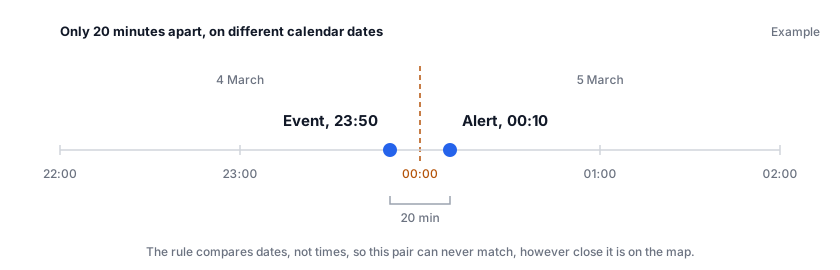
The radius I at least made on purpose. The date rule I made by accident, in the line that flattens a timestamp to a calendar date, and did not notice until an obvious pair failed to match. Same day is not the same as same time. An event at 23:50 and an alert at 00:10 the next morning are 20 minutes apart and, to this script, on different days. They will never match.
What I would do differently: make the radius and a date tolerance into arguments instead of constants, so the output can be re-run at several settings and compared; build a small hand-labelled set of pairs to check the rules against, because right now the only test of the matching is whether the total looks plausible; and fix the bug below.
A look at the code
The test at the centre of it, rewritten to stand alone:
from datetime import date
from geopy.distance import geodesic

RADIUS_KM = 10

def same_thing(alert_date, alert_point, event_date, event_point):
    """Do these two rows describe the same real-world thing?"""
    if alert_date != event_date:              # same calendar day, nothing finer
        return False
    km = geodesic(alert_point, event_point).km
    return km <= RADIUS_KM

# Example coordinates, roughly 5.5 km apart:
same_thing(date(2026, 3, 4), (10.00, 20.00),
           date(2026, 3, 4), (10.03, 20.04))   # -> True
Nine lines of logic, and every argument anyone will ever have about this tool is inside them.
And the defect. When an alert found a match, I updated the results with a filter on the date rather than on the row:
# What it does: one hit marks the whole day.
if matched_event is not None:
    same_day = alerts["date"] == alert_date
    alerts.loc[same_day, "matched"] = True
    alerts.loc[same_day, "matched_event"] = matched_event

# What it should do: mark only the row that actually matched.
if matched_event is not None:
    alerts.at[alert_index, "matched"] = True
    alerts.at[alert_index, "matched_event"] = matched_event
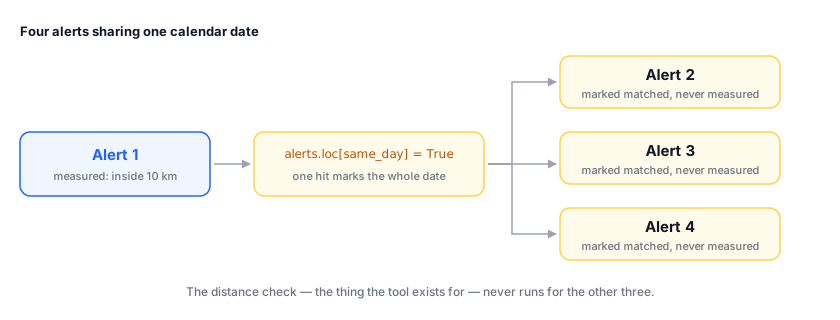
This is the worst kind of bug: it never raises an error, it produces a fuller-looking answer than the truth, and the headline percentage goes up.
Here it is on 7 invented alerts and 2 invented events, with 5 of the alerts sharing 4 March. The same rows go through the buggy update and then the fixed one:
$ python3 overmatch_demo.py
--- output rows dated 2026-03-04, as written (bug)
alert_id       date  matched matched_event
 AL-2202 2026-03-04     True       EV-0412
 AL-2203 2026-03-04     True       EV-0412
 AL-2204 2026-03-04     True       EV-0412
 AL-2205 2026-03-04     True       EV-0412
 AL-2206 2026-03-04     True       EV-0412
rows in this block whose distance was measured: 1 of 5
matched overall: 6 of 7

--- output rows dated 2026-03-04, fixed
alert_id       date  matched matched_event
 AL-2202 2026-03-04     True       EV-0412
 AL-2203 2026-03-04    False
 AL-2204 2026-03-04    False
 AL-2205 2026-03-04    False
 AL-2206 2026-03-04    False
rows in this block whose distance was measured: 5 of 5
matched overall: 2 of 7
What it can’t do
Read this before trusting a number it prints
It over-matches. One match on a date marks every alert sharing that date as matched, without measuring their distance. Any total this version prints is an upper bound, not a count.
It cannot see time of day. Matching is on the calendar date only. An event at 23:50 and an alert at 00:10 the next morning are treated as different days and will never pair, however close together they are on the map.
A match is an invitation to look, not evidence of a link. Same day within 10 km means worth a human look. Two unrelated things happening near each other on the same day satisfy the rule perfectly.
One event can satisfy many alerts. There is no deduplication, and only the first qualifying event is recorded even when several are in range.
It assumes clean input. Missing coordinates, malformed dates and absent columns are not handled, nor is a missing file.
Where this sits in the series
This is stage 4 of the 6-stage spine — Analyze — with no AI anywhere in it. The job it does is the one I described there as something a model is good at: noticing that 2 records are describing the same event. Here it is done by 2 rules you can read in a sentence and argue with in a meeting.
The line count is not the point. Those 60 lines decided what “the same” means for 2 datasets somebody then drew a conclusion from, and got part of it wrong.
Two later posts are the direct answer to this one’s weaknesses. Does your AI step actually work? is how you would find the over-matching bug deliberately instead of by accident — a hand-labelled set of 50 pairs would have caught it in an afternoon. Storing and searching what you collect is the general version of the matching problem, where deciding 2 records describe the same thing is the whole job rather than a side effect.