
The Analyst's Stack Part 6 of 22
A leak-site watcher: the whole pipeline in one script
The smallest complete thing I have built: every stage of the pipeline present, none of them elaborate.
Why I built it
There is a leak site that posts new entries. They appear at hours nobody sensible is awake for, they are sometimes gone within a day, and the files attached to them disappear faster than the pages do.
What that costs you is not analysis time. It is the 2 things you cannot get back: knowing early, and having your own copy. By the time someone forwards you a link, you are reading their account of a page you can no longer open.
Doing it by hand looks like this. Open the listing. Compare it against your memory of yesterday. Open anything new. Screenshot it, save the images, download the attachments, notice that 3 of them failed, write yourself a note to retry those 3 tomorrow, and then tomorrow fail to find the note.
I was doing that several times a day and still arriving late.
What it solves
The gap between an entry appearing and me knowing about it is now at most 15 minutes — the poll interval — and usually less. That is the whole headline.
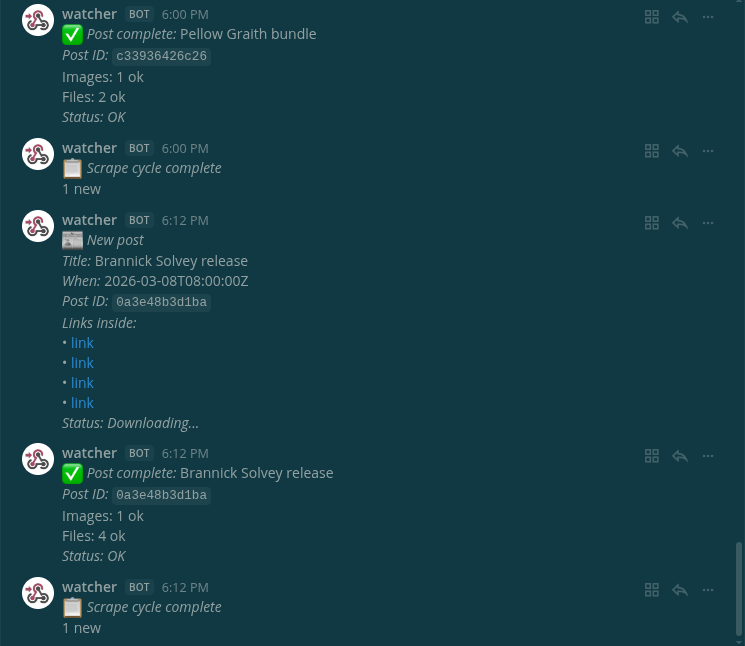
Underneath it: each new entry produces one chat message with the title, the time and up to 10 of the links inside it, a folder on my own disk holding a full-page screenshot and every image and download, and a second message saying what landed and what did not. Failed downloads are retried on later runs, up to 15 attempts per file, because a file that times out at three in the morning is usually there at four.
How it works


Collect. Two discovery routes: the feed if the source is serving one, the listing pages if it is not, walked 5 pages deep. A feed can quietly stop; the listing page is the version that keeps working.
Normalize. Every candidate becomes the same 4 fields — URL, title, timestamp, attached links — before anything downstream touches it.
Store. A SQLite file with 2 tables: one row per entry, one row per file. Every entry gets a 12-character identifier derived from its path. This is the stage that separates a tool from a script that shouts every 15 minutes.
Analyze. For a genuinely new entry: fetch the page, pull out the images and the downloadable files, check each link is reachable before promising it, then download. A headless browser takes one full-page screenshot at 1280×720 and does nothing else.
Alert. Two messages, not one. The first goes out the moment an entry is detected, before any downloading, because the link is the urgent part. It lists at most 10 of the links inside the entry so the message stays readable. The second reports the result: how many images and files landed.
Present. A read-only command that queries the same database: what has been seen, what is pending, what failed and why.
$ python3 status.py
  ────────────────────────────────────────────────────────────────────────────────────────────────────────────
  Title                                         Imgs  Files  File names                            Status
  ────────────────────────────────────────────────────────────────────────────────────────────────────────────
  Brannick Solvey release                          1     4  solvey_part1.zip, solvey_part2.zip,…  ok
  Varrow Teklund dump                              1     3  teklund_ledger_q3.zip, varrow_minut…  ok
  Quillmere Ostrava archive                        1     2  ostrava_index.pdf, quillmere_notes.…  ok
  ────────────────────────────────────────────────────────────────────────────────────────────────────────────

=== Summary ===
  Posts: 3 total  |  ok: 3
  Files: 9 total  |  ok: 9
  Pending/Downloading now: 0
How I built it
Python, because the parsing libraries are there and because I wanted to be able to read
it a year later. An async HTTP client, a feed parser, BeautifulSoup for the HTML, SQLite
from the standard library, and a headless browser used solely for the screenshot.
Optionally aria2c (a command-line downloader that resumes interrupted transfers) for
the large attachments, falling back to plain HTTP when it is absent. It runs as a loop on
a small machine and the whole thing is under 2,000 lines.
Three choices, and two of them are there because the first version got it wrong.
The identifier ignores the domain. Sites like this move. Had the identifier been the full URL, a host change would have made every existing entry look new and the tool would have re-announced and re-downloaded its entire history. Deriving it from the path alone means a domain change costs one configuration line.
Retry state lives in the database, not in memory. Each file row carries its own attempt counter and status, so a run that dies halfway through loses nothing; the next run picks up whatever is still pending. This sounds obvious and I did not do it the first time.
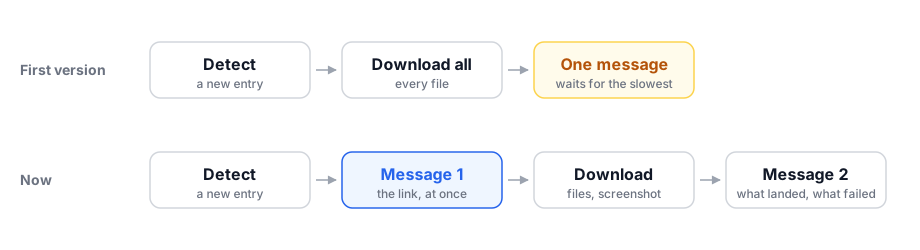
Two messages instead of one. The first version waited until the downloads finished before saying anything, so a slow attachment delayed the alert. Splitting detection from completion fixed the only failure that actually mattered.
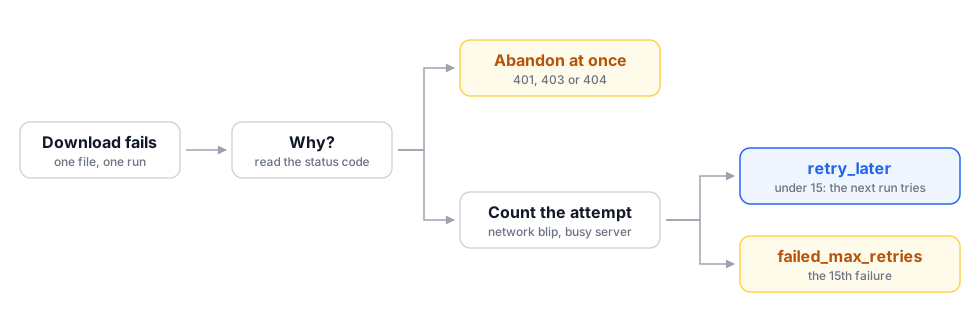
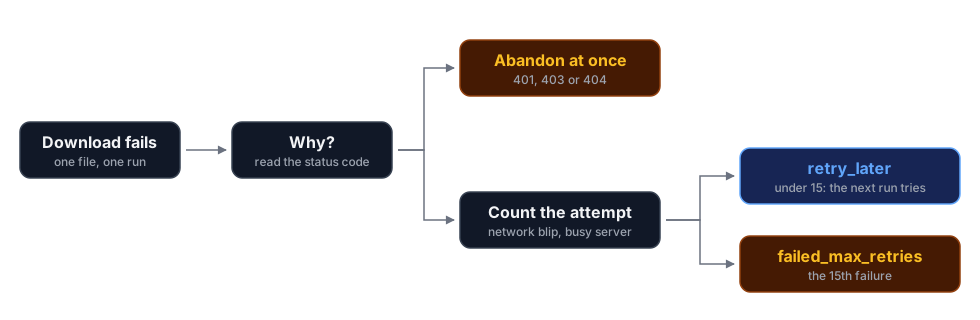
The hard part was none of that. It was failure taxonomy: a download can fail because the network blinked, because the server is briefly overloaded, or because the file is gone — and the first two want retrying, up to 15 attempts in all, while the third wants abandoning at once. Treat all three the same and you get either a queue that never drains or a tool that gives up on a file that was going to arrive.
What I would change: the timeouts are hardcoded, and the listing parser reads only the HTML that arrives. Neither has bitten yet. Both are the kind of thing that bites once, silently.
What I would add is a better copy of the page itself: raw HTML opened a month later is missing its images, styling and fonts. SingleFile, through its command-line version, saves an entry page as one self-contained HTML file that is easy to hash and archive beside the downloads; the hash proves your copy has not changed since you took it. It drives a real browser against the source, so it carries the same OPSEC concerns as the polling.
A look at the code
The identifier, rewritten to stand alone:
import hashlib
from urllib.parse import urlparse, unquote

def post_identity(url):
    """The part of a URL that identifies the post, ignoring where it is hosted."""
    parts = urlparse(url.strip())
    path = unquote(parts.path or "").rstrip("/").lower() or "/"
    query = (parts.query or "").strip()
    return f"{path}?{query}" if query else path

def post_id(url):
    """A stable 12-character key. Same entry, same key, whatever the domain."""
    return hashlib.sha256(post_identity(url).encode()).hexdigest()[:12]

# One entry, reachable at two different hosts, is one row:
post_id("https://example.com/posts/2026/an-entry")    # '34510e6e9281'
post_id("https://example.net/posts/2026/an-entry/")   # '34510e6e9281'
And the failure taxonomy, which is the part I would keep if I had to throw the rest away:
MAX_ATTEMPTS = 15
GIVE_UP_ON = {401, 403, 404}   # asking again will not change the answer

def record_failure(db, entry, url, status_code, message):
    """Count one failed download. `db` is an open sqlite3 connection.
       Returns the file row's new status."""
    if status_code in GIVE_UP_ON:
        db.execute(
            "UPDATE files SET status = ?, error = ? WHERE entry = ? AND url = ?",
            (f"failed_{status_code}", message, entry, url),
        )
    else:
        db.execute(
            """UPDATE files
                  SET attempts = attempts + 1,
                      error    = ?,
                      status   = CASE WHEN attempts + 1 >= ?
                                      THEN 'failed_max_retries'
                                      ELSE 'retry_later' END
                WHERE entry = ? AND url = ?""",
            (message, MAX_ATTEMPTS, entry, url),
        )
    db.commit()
    row = db.execute(
        "SELECT status FROM files WHERE entry = ? AND url = ?", (entry, url)
    ).fetchone()
    return row[0]
Everything the next run needs is in that one row. No queue, no job runner, and no state anywhere a power cut could take with it.
What it can’t do
The edges of a small tool
The bigger limitation is conceptual. There is no intelligence in stage 4 at all: nothing translates, classifies or scores. It tells you something exists and hands you a copy. Every judgement about what that means happens in a human head, which for this source is exactly where I want it.
What that leaves behind is a folder. One entry, from a demo run against a local page,
listed with tree:
$ tree -h --dirsfirst archive/
[   60]  archive/
└── [  140]  34510e6e9281
    ├── [  100]  files
    │   ├── [ 2.3M]  bundle-a.7z
    │   ├── [ 889K]  bundle-b.7z
    │   └── [  62K]  readme.txt
    ├── [  100]  images
    │   ├── [  41K]  image-01.png
    │   ├── [  85K]  image-02.png
    │   └── [  12K]  image-03.png
    ├── [ 3.0K]  entry.json
    ├── [  60K]  listing.html
    └── [ 145K]  screenshot.png

4 directories, 9 files
Where this sits in the series
This is the 6-stage spine with every stage present and none of them ambitious. The version you can type in an evening is the first workflow post — the same collect, identify, store and notify loop, minus the archiving and the retry ladder.
The gap between those 60 lines and this is not cleverness. It is the accumulated weight of things that went wrong once.
The hash-as-identity trick here is the smallest possible version of a much larger problem, and storing and searching what you collect is where that problem gets taken seriously.