
The Analyst's Stack Part 11 of 22
A geofence that knows crossing from staying
This tool does not ask what is happening now. It asks what a recorded sequence of positions already proves.
Why I built it
The desk had thousands of recorded tracks for moving objects, and one question: which of them were in this area?
By hand that is a mapping tool, one file at a time, an outline you drew yourself, and a judgement. Minutes per file. Thousands of files. The judgement gets worse somewhere in the third hour, and you cannot tell afterwards which answers came from the good hours.
The obvious shortcut is worse than doing nothing. Ask a geofence (a test for whether a coordinate falls inside an outline you have drawn on a map) whether the object’s path crossed the area and you get a clean, fast, useless answer: a path that clipped a corner for a few seconds and a path that circled inside it for half an hour both come back true. That is the shape of a question I was not asking.
Most of the tools in this series ask is there something new, get an answer, and exit. This one asks something a single observation cannot answer at all.
What it solves
One pass over the folder of recorded tracks returns 2 lists. Objects whose positions put them inside the area long enough to count. And objects whose path merely intersects it.
Then it writes the disagreement between those 2 lists to its own file — crossed but never really in, and in but never crossing as a line. That set is small and it is where every interesting case turned out to live.
“Long enough” is one number, and it is the only tuned number in the tool: 20 recorded positions inside the outline. Below that, the object touched the area. At or above it, the object was in the area. That sentence is a judgement about how often the source samples a position, and I will come back to how badly it can be wrong.

How it works


Collect. Two inputs, neither of them live. A reference table describing the objects, scraped once from a public listing — roughly 1,700 pages, 3 at a time, with a page counted as already done if the file sitting on disk is over 16 KB. And a folder of recorded track files, one per object, each holding a sequence of timestamped positions.
Normalize. Names and codes arrive in whatever case and spelling the source felt like. This stage forces one shape, fills gaps by matching rows that agree on the fields that do not vary, and drops duplicates.
Store. Every run writes into its own folder stamped with the time it started. No run can overwrite another, which matters more than it sounds when you are changing one threshold and comparing outcomes.
Analyze. The geofence, twice over. Once against the path as a continuous line, asking whether it intersects the outline at all. Once against the individual recorded positions, counting how many of them fall inside. These are different questions and they disagree often enough to be worth keeping both.
Alert. There is none. Nothing messages anybody; you run it and you read the output.
Present. Spreadsheets, plus a copy of every track file that matched, so the evidence for a row travels with the row.
$ python3 show_disagreements.py
== flights_matched_by_tracks_but_not_positions.xlsx (4 rows)
object_id          type      operator       date                                     kml    filename matched_by
  DEMO-01     Cargo jet   Example Air 2026-03-02 https://example.test/tracks/demo-01.kml demo-01.kml      track
  DEMO-02 Passenger jet   Example Air 2026-03-02 https://example.test/tracks/demo-02.kml demo-02.kml      track
  DEMO-03  Business jet Acme Aviation 2026-03-03 https://example.test/tracks/demo-03.kml demo-03.kml      track
  DEMO-10  Business jet   Example Air 2026-03-10 https://example.test/tracks/demo-10.kml demo-10.kml      track

== flights_matched_by_positions_but_not_tracks.xlsx (2 rows)
object_id            type      operator       date                                     kml    filename matched_by
  DEMO-05 Survey aircraft   Example Air 2026-03-05 https://example.test/tracks/demo-05.kml demo-05.kml   position
  DEMO-09 Survey aircraft Acme Aviation 2026-03-09 https://example.test/tracks/demo-09.kml demo-09.kml   position
How I built it
Python, pandas, and Shapely for the geometry — the point-in-polygon test is the one piece I had no interest in writing myself. The outline itself is 17 coordinate pairs, the last repeating the first to close the ring. It was drawn by hand and it lives in the source file.
The interesting decision was not which library. It was realising that inside is not a property of an object, it is a property of an observation, and that the thing I actually wanted to know was a property of a sequence of them.
Once you accept that, the questions get sharper. Did the answer change between one observation and the next? That is an entry or an exit. How many observations sit between those 2 changes? That is dwell. A count of 20 was where the answer stopped being noise.
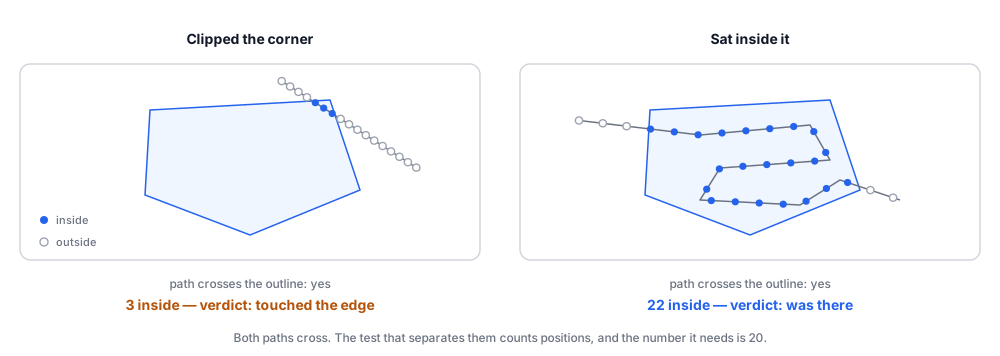
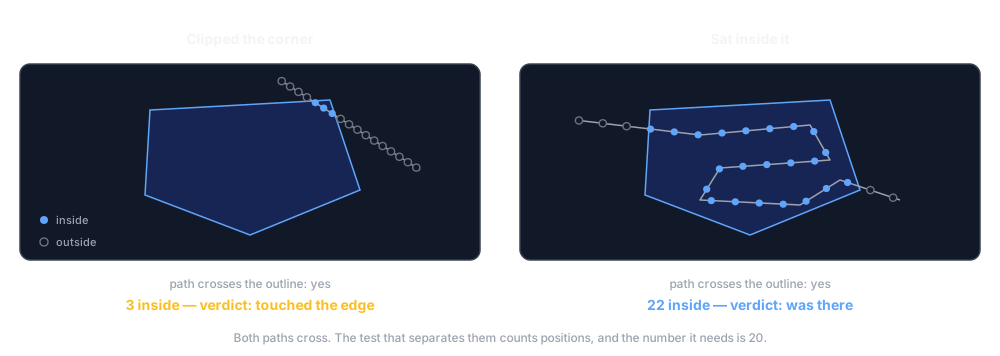
What was hard was the failure mode in the middle. A track whose positions are recorded every few seconds and a track whose positions are recorded every few minutes produce wildly different counts for the same real behaviour, and nothing in the file announces which kind you are holding. A fixed count of 20 silently means “a few minutes” for one source and “a large part of an hour” for another.
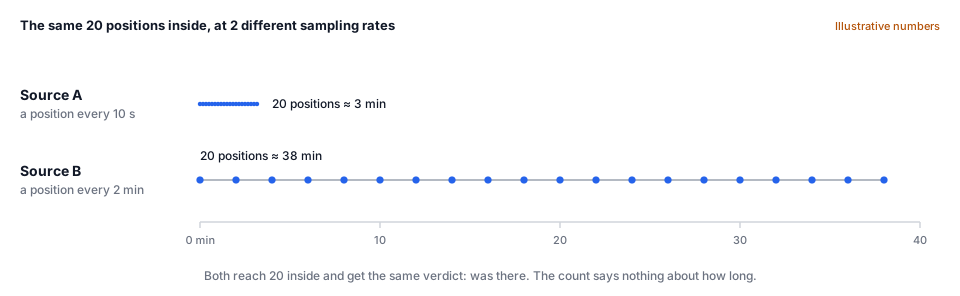
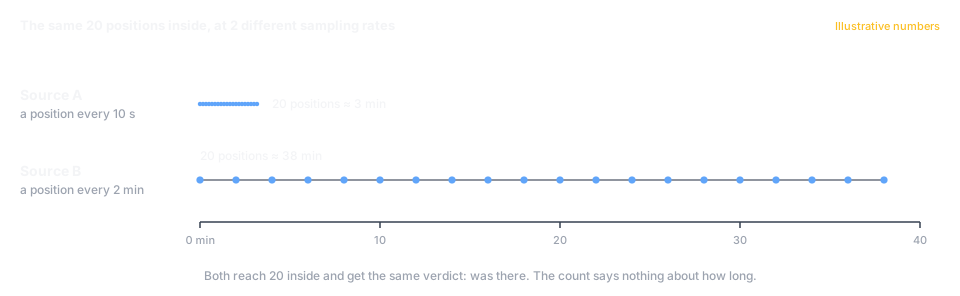
What I would change: make the threshold a duration rather than a count, and derive the sampling interval from the timestamps that are already in the file. I never did. The tracks I was reading came from one source at one cadence, and a threshold that is only correct by coincidence is the kind of thing that survives until the day it doesn’t.
A look at the code
The geofence itself, which is genuinely this small:
from shapely.geometry import Point, Polygon

# An area of interest: a closed ring of (longitude, latitude) pairs, drawn by
# hand. The last pair repeats the first, and that repetition is what closes it.
# These numbers are made up; the real outline has 16 corners.
area = Polygon([
    (10.0, 20.0), (12.0, 20.1), (12.6, 21.4),
    (11.4, 22.0), (10.2, 21.3), (10.0, 20.0),
])

def inside(observation):
    """One recorded position -> inside the area, or not."""
    lon, lat = observation[0], observation[1]
    return area.contains(Point(lon, lat))
And the part that needs more than one observation to answer:
from shapely.geometry import Point

DWELL = 20   # positions inside before "it was there" is a claim worth making

def verdict(track, area):
    """`track` is one object's recorded positions, oldest first: a list of
       (lon, lat) pairs. `area` is the polygon above."""
    flags = [area.contains(Point(lon, lat)) for lon, lat in track]
    count = sum(flags)

    # Every point where the answer changed between one observation and the
    # next. An odd number of these means the track finished on the opposite
    # side of the outline from the side it started on.
    changes = [i for i in range(1, len(flags)) if flags[i] != flags[i - 1]]

    if count == 0:
        return "never inside"
    if count < DWELL:
        return f"touched the edge: {count} inside, {len(changes)} crossings"
    return f"was there: {count} inside, {len(changes)} crossings"
Nothing in that function knows what the object is or what the area means. It knows the order the observations arrived in, and that is enough to tell entering from passing.
One pass over a folder of 12 invented tracks, against the 5-corner outline above:
$ python geofence_pass.py tracks/
tracks: 100%|██████████| 12/12 [00:00<00:00, 1407.68file/s]

track      points inside changes  crosses  verdict
OBJ-1042      120     62       2      yes  was there
OBJ-1077       90     90       0      yes  was there
OBJ-1103       60      0       0       no  never inside
OBJ-1128       40      0       0       no  never inside
OBJ-1150      200    200       0      yes  was there
OBJ-1166       55      0       0       no  never inside
OBJ-1189       35     10       1      yes  touched the edge
OBJ-1204       24      9       2      yes  touched the edge
OBJ-1231      150    150       0      yes  was there
OBJ-1247       70      0       0       no  never inside
OBJ-1266       18     18       0      yes  touched the edge
OBJ-1288      300    224       2      yes  was there

matched by positions (20+ inside):    5
matched by path only:                 3
elapsed: 0.01s over 12 tracks
yes under
crosses and still fail the dwell test, and OBJ-1266 fails it by 2 positions.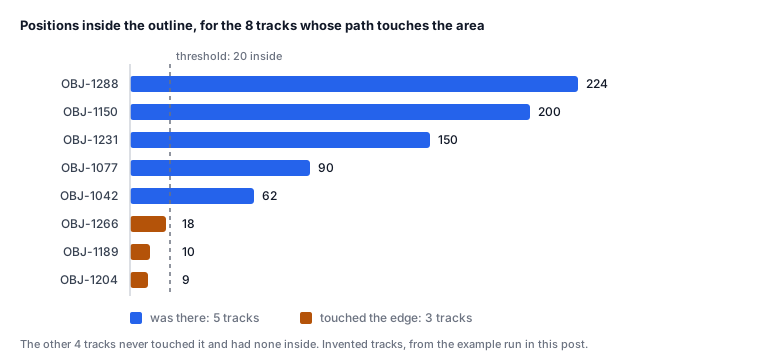
What it can’t do
The threshold is a guess about the source
It fails by returning nothing
The reference table ages
And the honest framing one: it answers a question about the past. It reads tracks that were finished before it started. Knowing that something is in an area right now is a different tool, with a different set of problems, and this is not it.
Where this sits in the series
This is stage 4 of the 6-stage spine carrying almost the entire weight of a tool, which is unusual — most of the showcase spreads the work more evenly.
It is also the clearest case I have of something the first workflow post does not prepare you for. That loop asks one question per item and gets an answer. This one cannot: the unit of analysis is the sequence, and every judgement worth making lives in the changes between one observation and the next.
The 20-point threshold in here is exactly the kind of number that deserves measuring rather than choosing. Does your AI step actually work? is how you would find out whether it is right, and what to do when adjusting it makes one kind of error worse while fixing another.