
The Analyst's Stack Part 2 of 22
Building your first automation workflow
The previous post described 6 stages. This one builds 4 of them, in about 60 lines, for a problem small enough to finish in an evening.
I am going to be deliberate about one thing: the code here is not the interesting part. The interesting parts are the 3 decisions that sit around it, and those are the same whether you write Python, use a visual tool, or pay someone. If you skim, skim the code and read the prose.
Pick the right first problem
Not your most important source. Your most repetitive one.
The right first problem has 4 properties: it repeats, the source holds its shape, you already check it by hand, and you would be annoyed if you missed something. In my case that was a site that posted new entries at unpredictable hours, which I was checking maybe five times a day and still missing things from.
Write down what you do by hand, one line per step, before you write any code:
- Open the page.
- Look at the list of entries.
- Notice which ones are new since last time.
- If any are new, read them.
- If one matters, tell someone.
That is stages 1 through 5. The sixth, present, is not on the list, and this post does not build it either. Step 3 is the one that is hard to do in your head and trivial to do in code, which is the whole reason this is worth automating.
Python 3.11+
Two libraries
pip install requests beautifulsoup4. One fetches pages, the other reads HTML. Nothing
else in this post is an external dependency.A page to watch
Never written Python?
You can follow the argument without it: the prose carries it. To run the code yourself, these 3 free courses get you there. Take them in this order.
- futurecoder, if you have never programmed at all. An interactive course that runs in your browser: you type code and answer questions to move on, with nothing to install.
- PyBasic, for practice once the basics make sense. Short lessons with exercises that run in the browser, in beginner, intermediate and advanced levels.
- Python for OSINT in 21 days, when you want the same skills aimed at this work. A course PDF plus code for each day, covering HTTP requests and APIs, JSON and CSV, scraping and regular expressions. You run it in a GitHub Codespace or on an Ubuntu-based Linux machine.
Stages 1 and 2: fetch, then flatten
Fetching is 3 lines. Normalizing is the part that matters, and it is the part that looks pointless right up until it saves you.
import requests
from bs4 import BeautifulSoup

HEADERS = {"User-Agent": "research-monitor/1.0 (analyst@example.test)"}

def fetch_entries(url):
    """Return a list of dicts, one per entry, in a shape we control."""
    response = requests.get(url, headers=HEADERS, timeout=30)
    response.raise_for_status()

    soup = BeautifulSoup(response.text, "html.parser")
    entries = []
    for row in soup.select("article.entry"):
        link = row.select_one("a")
        entries.append({
            "title": link.get_text(strip=True),
            "url":   requests.compat.urljoin(url, link["href"]),
        })
    return entries
The parsing is the part you were looking at. Two smaller things matter more.
The User-Agent is honest. It says what the tool is and gives a way to reach the
person running it. That is a courtesy, and it is also the difference between looking like
a researcher and looking like a scraper to whoever reads the server logs. OPSEC for
automation goes into this in depth.
The return value is a shape you chose, not a shape the site chose. Every entry has a title, a URL, and nothing else. When you add a second source next month, the new fetcher returns the same 2 keys and every line of code after this point keeps working. This is the whole of stage 2, and it is 4 lines.
`raise_for_status` is not optional
Stage 3: the gate
Here is the part that turns a script into a tool.
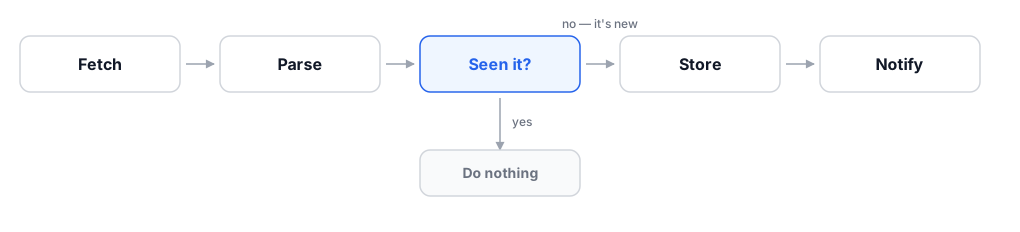
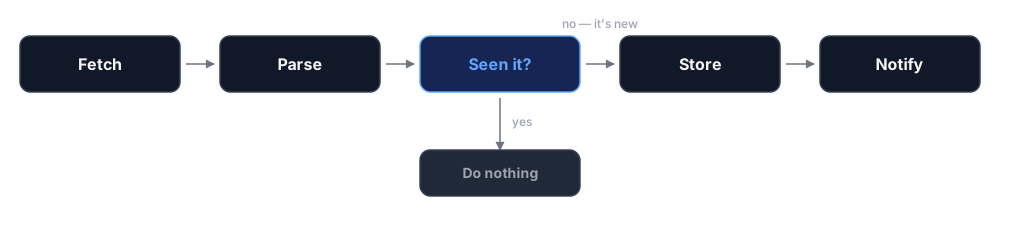
You need to answer, for each entry: have I seen this before? To answer it tomorrow, the answer has to survive the program exiting. And to compare reliably, each entry needs an identifier that does not change between runs.
Titles change. Positions on the page change. URLs sometimes carry tracking parameters that change every time you load them. So build the identifier yourself, from the parts you trust:
import hashlib
import sqlite3

def entry_id(entry):
    """A stable fingerprint for one entry. Same entry, same ID, every run."""
    basis = f"{entry['url']}|{entry['title']}".encode("utf-8")
    return hashlib.sha256(basis).hexdigest()[:16]

def open_store(path="seen.db"):
    db = sqlite3.connect(path)
    db.execute("""
        CREATE TABLE IF NOT EXISTS seen (
            id       TEXT PRIMARY KEY,
            title    TEXT NOT NULL,
            url      TEXT NOT NULL,
            first_seen TEXT NOT NULL
        )
    """)
    return db

def remember(db, entry):
    """Store an entry. Returns True if it was new, False if we already had it."""
    cursor = db.execute(
        "INSERT OR IGNORE INTO seen (id, title, url, first_seen) "
        "VALUES (?, ?, ?, datetime('now'))",
        (entry_id(entry), entry["title"], entry["url"]),
    )
    db.commit()
    return cursor.rowcount == 1
INSERT OR IGNORE plus a primary key is the entire idempotency mechanism. The database
refuses the duplicate; rowcount tells you whether it was new. There is no separate
“have I seen this” query to get out of step with the insert, and no window between
checking and writing where a second copy of the program could slip through.
Why 16 characters
There is no stage 4 here: deciding whether a new entry matters is a judgement, and at 4 messages a week you settle it faster by reading them than by building anything.
Stage 5: tell a human
WEBHOOK_URL = "https://chat.example.test/hooks/your-webhook-id"   # the URL your chat tool gives you

def notify(entry):
    requests.post(
        WEBHOOK_URL,
        json={"text": f"New entry: {entry['title']}\n{entry['url']}"},
        timeout=15,
    )
That is genuinely it. Most chat tools — Slack, Discord, Mattermost, Telegram via a bot — will give you a webhook (a URL you can POST a message to, which then appears in a channel) in about 2 minutes. Email works too and is more annoying.
Send the link, not the content. You want to be pulled toward the source, not given a summary that quietly becomes the thing you remember.
The whole thing
Put every snippet above into one file, in the order they appear, and add this at the
bottom. Save it as watch.py.
def run(url):
    db = open_store()
    new_count = 0
    for entry in fetch_entries(url):
        if remember(db, entry):
            notify(entry)
            new_count += 1
    print(f"checked {url}: {new_count} new")

if __name__ == "__main__":
    run("https://example.com/updates")
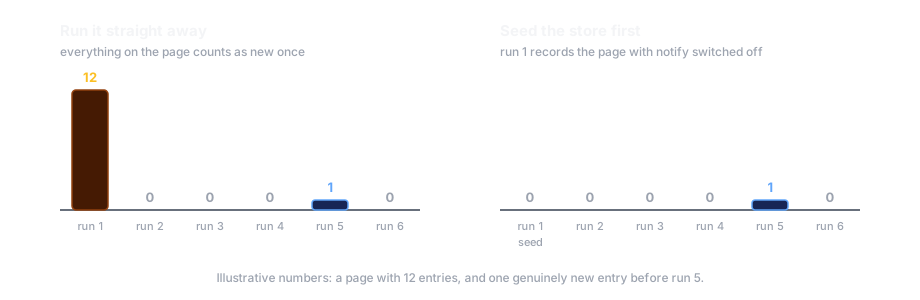
Run it once and you get a burst of notifications for everything currently on the page — the first run has nothing to compare against. Run it a second time and you get nothing. That silence is the tool working.
The first-run problem, solved in one line
notify
call commented out. Everything currently on the page is recorded as seen, and you start
getting alerts from the next genuinely new item.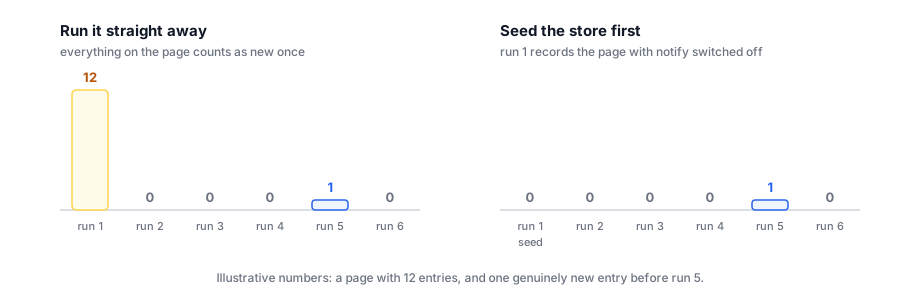
Stage 6, and the honest answer about it
There is no present stage here. A chat message is the whole interface.
That is the right call for a first build, and I want to be clear that it is a call and not an oversight. Building a dashboard for a tool that produces 4 messages a week is a way of spending 3 weekends without getting more done. Add a presentation layer when you notice yourself asking questions the chat history cannot answer — how many this month, from which source, how does that compare to March. Until then the store is a SQLite file (a database that is just a file on disk, with no server to run) and the interface is whatever asks it questions.
Scheduling
Pick the boring option.
*/15 * * * * cd /home/you/monitor && /usr/bin/python3 watch.py >> run.log 2>&1
That is a cron line: every 15 minutes, run it, and append everything it prints —
including errors — to a log file. On a laptop that sleeps, a systemd timer with
Persistent=true is better, because it catches up on a run it missed instead of
pretending the gap never happened.
Do not put the interval in your code. Scheduling is an operational decision you will want to change without editing anything, and a fixed interval is also a signature — the OPSEC post is about why.
The failure that looks like good news
This is the section I would keep if I had to delete the rest.
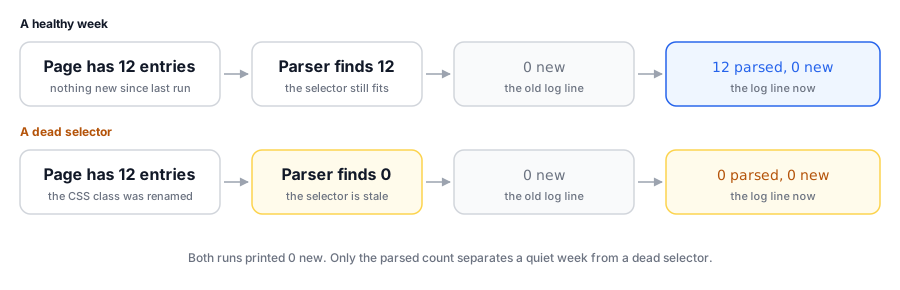
Your monitor has 2 ways to fail. It can crash, which is loud and fine — you notice, you fix it. Or it can keep running and return nothing — and an empty inbox is also what a working monitor gives you on a week the source published nothing.
Silent failure is the default outcome of almost every change a website makes. They rename
a CSS class, your select("article.entry") matches zero rows, and the script reports
“0 new” every 15 minutes for a month while you feel pleasantly on top of things.
Two defences, both small:
def run(url):
    db = open_store()
    entries = fetch_entries(url)

    # A page that suddenly has nothing on it is a bug until proven otherwise.
    if not entries:
        raise RuntimeError(f"{url}: parsed 0 entries — selector is probably stale")

    new_count = 0
    for entry in entries:
        if remember(db, entry):
            notify(entry)
            new_count += 1

    print(f"checked {url}: {len(entries)} parsed, {new_count} new")
Alarm on zero. Finding nothing on a page that always has something is a defect, not a result. Treat it as an error so it reaches you.
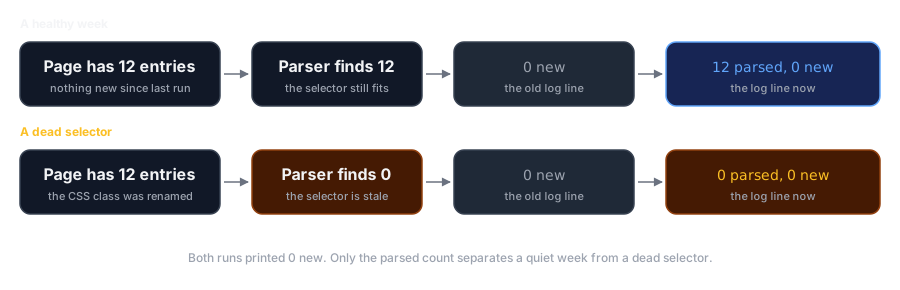
Log what you parsed, not just what was new. 12 parsed, 0 new is a healthy week.
0 parsed, 0 new is a broken selector. Those 2 facts are identical in the output of
the first version of this script, and that is why it prints both now.
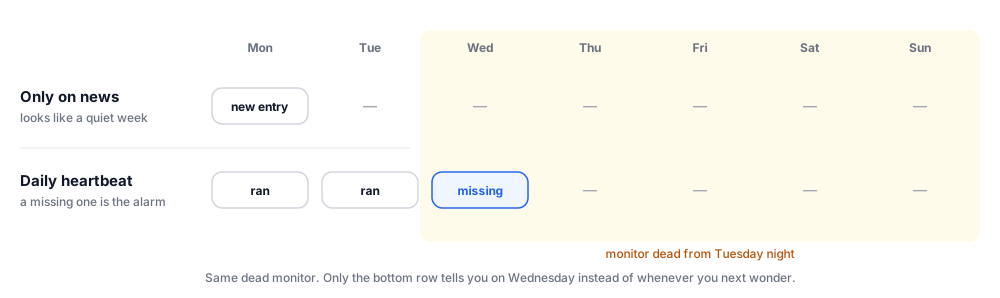
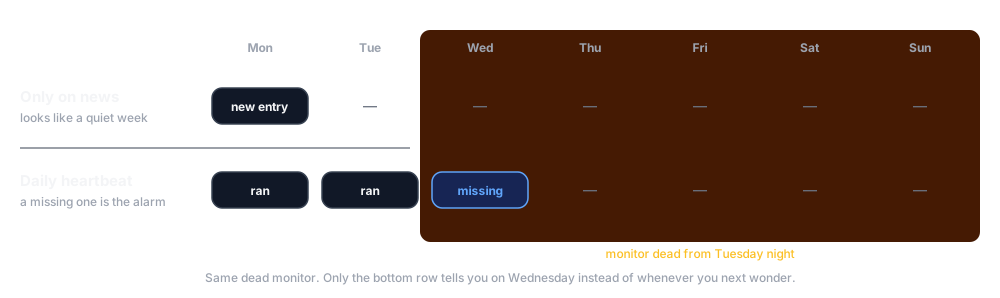
The third defence costs one line and is the one people skip: a heartbeat. Once a day, have the job tell you it ran, even when it found nothing. A tool that only speaks when something happens is a tool you cannot distinguish from a tool that has been dead since Tuesday.
What this script cannot do
The part that is not technical
Before any of the above: check what you are allowed to do.
Read the site’s terms. Look for a robots.txt. Consider whether the data you are about
to accumulate is personal data, and whether the rules that apply to you change once you
are holding a lot of it rather than looking at one page. Collecting something at scale
can make it a different thing legally and ethically than reading it once, and that
distinction does not care how elegant your code is.
If you are unsure, the answer is to ask someone whose job it is to know, before you have a database full of something.
Knowing when to stop
The strongest signal that a tool is finished is that you have started improving things nobody asked about. Configuration files for settings you change once a year. A retry policy for a failure you have never seen. A web interface for 4 messages a week.
The test I use: can I name the specific thing that goes wrong today if I do not build this? If the answer is a scenario rather than a memory, I stop. The 60-line version that has been running for 2 years has been worth more to me than every ambitious rewrite of it I have started and abandoned.
Next in the series: where AI actually fits — which is stage 4, and only stage 4.